Top Phones for Kids & Teenagers (UK 2026) – Safe, Affordable & Parent-Friendly Picks
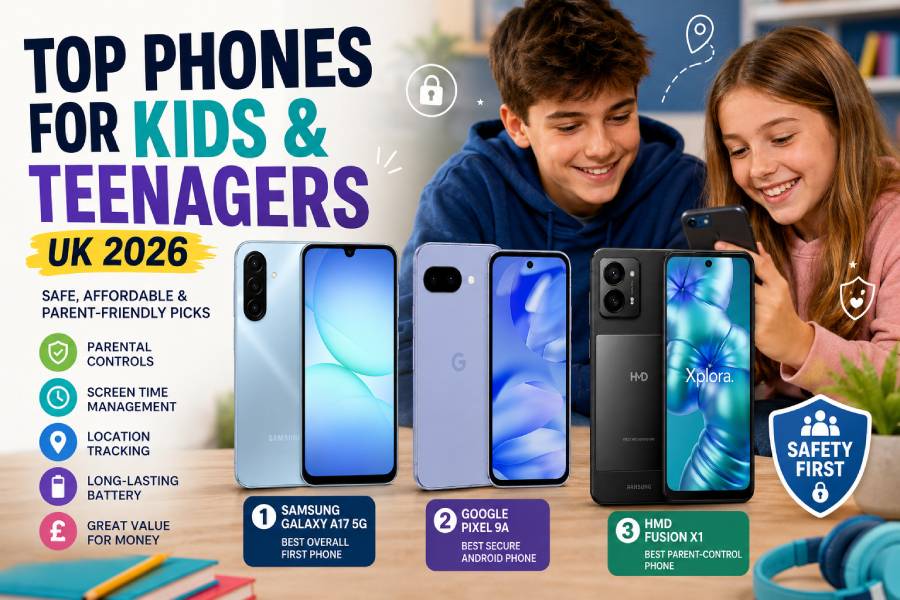
Reviewed for parental controls, safety features, durability, battery life & value – updated May 2026
🥇 Samsung Galaxy A17 5G – Best overall first phone for kids and teens → Check price on Amazon UK
🥈 Google Pixel 9a – Best secure Android phone for teenagers → Check price on Amazon UK
🥉 HMD Fusion X1 – Best parent-control phone for younger kids → Check price on Amazon UK
👉 Scroll down to see full reviews and Amazon UK links
Introduction
Choosing a child’s or teen’s first phone is different from buying one for an adult. Parents want safety features – parental controls, screen-time limits and location sharing – plus a decent camera and battery. Kids need calls, messaging apps and school apps (homework, maps) without too much cost. We look for phones that are affordable but still get software and security updates for years, so the phone stays safe and useful. The very cheapest phones often lack updates and robust controls.
This UK guide covers three current models chosen for safety and value. The Samsung Galaxy A17 5G is a well-rounded affordable smartphone with a large screen and long battery life, making it ideal as a first phone for most families. The Google Pixel 9a (new for 2025) brings Google’s clean Android, 7-year update support and a top camera – good for older teens who need strong security and performance. The HMD Fusion X1 is a specialised kids’ phone built with Xplora’s safety tools – it starts with zero apps and gives parents tight control (safe zones, trusted contacts, etc.), plus a durable, repairable design. All picks are available new in the UK (Amazon UK and other retailers). We compared them for parental controls, screen time tools, and everyday usability to help you pick the right phone for your child’s age and your family’s needs.
What Makes a Great Phone for Kids and Teenagers in 2026
- Parental controls & screen time: Phones should support built‑in kids modes or apps like Google Family Link. These let you block apps, require approval for downloads, and set daily time limits. Samsung devices also offer Samsung Kids mode for younger children.
- Location safety tools: A phone for kids should allow location sharing or safe zones. Most Android phones work with Google’s Family Link or Find My Device so parents can see their child’s whereabouts on a map. Some phones (like HMD Fusion X1) even let you set up geofences (home, school, etc.) and send alerts when kids arrive or leave[1].
- Affordable price & value: Kids’ phones should be budget-friendly, since they’re more likely to get dropped or lost. All our picks cost well under £400, and often closer to £150–£250. They strike a balance of specs and durability for the price. (Extremely cheap phones often lack necessary updates or features.)
- Durable design: A good kids’ phone is sturdy or easily protected. Look for models with at least some water/dust resistance and a solid build. For example, the Galaxy A17 5G is rated IP54 (splash-resistant). The Fusion X1 is even designed for self-repair – its case and screen can be easily replaced at home. Still, a rugged case is a smart idea for any child’s phone.
- Long battery life: Kids and teens need a phone that lasts a full school day or more. All our picks have large batteries (around 5000 mAh). The A17 5G and Fusion X1 both have 5000 mAh packs, and the Pixel 9a has about 5100 mAh. This means they typically run all day on one charge, even with messaging and video use.
- App/content restrictions: The phone should let you restrict web or app content. For younger kids, a device that starts with no social apps and requires parental approval (like the Fusion X1) is ideal. All Android phones allow some form of content filtering via family or device settings.
- Security updates: Regular OS and security updates keep phones safe. Samsung’s and Google’s child-friendly picks come with several years of guaranteed updates. For example, the Galaxy A17 5G is promised six OS upgrades and 6 years of security patches, and the Pixel 9a is guaranteed 7 years of updates. A phone that will still get updates in a few years is important for ongoing safety.
- Easy parental setup: The phone should be straightforward for parents to manage. Both Samsung and Google phones support linking a child’s account to yours so you can use a parental‑control app (Family Link) or built‑in settings to supervise usage[2].
- Good camera & messaging: While safety features are key, the phone still needs decent everyday specs: a camera for photos and video calls, and enough performance for WhatsApp, Maps and school apps. Our picks all have capable cameras and smooth Android performance for messaging and video chat.
Top 3 Phones for Kids and Teenagers (UK 2026)
1. Samsung Galaxy A17 5G – Best overall first phone for kids and teens
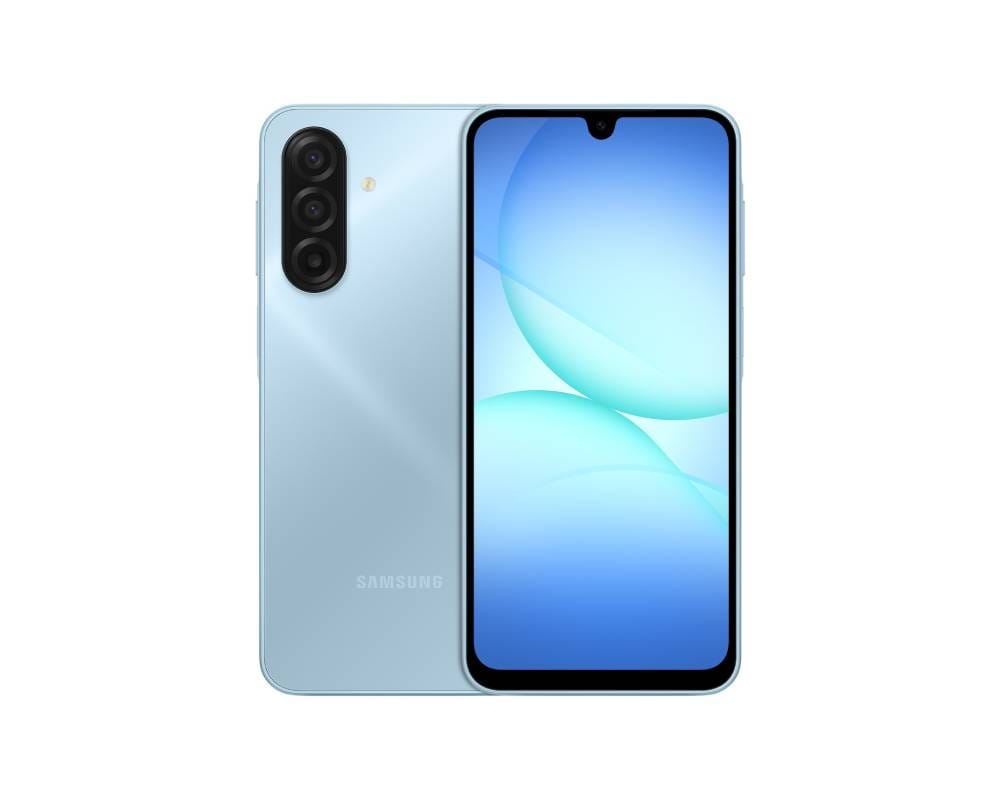
A friendly all-rounder, the Galaxy A17 5G is an affordable Android phone with a huge 6.7-inch display (for easy reading and video calls) and a long-lasting 5000 mAh battery. It runs Samsung’s One UI (Android 15/16) which supports Google Family Link and Samsung Kids Mode, letting parents easily set screen-time limits or block apps[3]. The phone includes a triple rear camera (50 MP main, 5 MP ultrawide, 2 MP macro) that takes good photos in daylight[4]. Performance is solid for everyday tasks – school apps, WhatsApp, maps and browsing – thanks to a mid-range chipset. Storage is generous (128 GB) and there’s a microSD slot for more space. Importantly, Samsung promises six Android upgrades and 6 years of security updates, so the phone will stay secure for years. On the downside, the Galaxy A17 is built from plastic and only splash-resistant (IP54), so a case is wise.
Why this pick:
✅ Pros: Very large 6.7″ screen for videos and schoolwork; 5000 mAh battery lasts all day. Supports Google Family Link and Samsung’s Kids Mode for easy parental setup. Promised updates/security patches through ~2031[5].
⛔ Cons: Modest mid-range performance – it can lag if kids push many apps at once. Basic plastic build (no full waterproofing).
Main standout feature: It combines excellent value (around £150–£170) with child-friendly features. The huge screen and long battery are rare at this price, and Samsung’s UI is familiar and easy for families.
Who it’s best for: Families wanting a reliable, budget-friendly first smartphone. The A17 5G covers all basic needs (calls, chat apps, school apps, light photography) and includes Android safety controls, making it a great all-rounder for older kids or younger teens.
Check our website: for more details about Samsung Galaxy A17
2. Google Pixel 9a – Best secure Android phone for teenagers
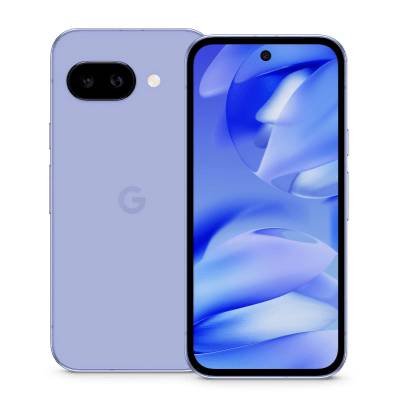
The Pixel 9a (new for 2025) is a clean Android phone built by Google. It shines on security and software support – Google guarantees 7 years of OS and security updates, far longer than most competitors. It has a 5100 mAh battery and Google’s Adaptive Battery tech, so even active teens will get a full day or more. The Pixel 9a’s camera system is outstanding for the price: a 48 MP main sensor plus a 13 MP ultrawide, backed by Google’s AI-powered photo software (features like Add Me and Macro Focus make fun photos easy). The 6.3-inch OLED display is bright and smooth (up to 120Hz), making video chats and apps look great. It also has IP68 water/dust resistance and Gorilla Glass, so it’s sturdier than a typical budget phone. Performance is strong too (Tensor G4 chip, 8GB RAM), so it handles games and multitasking easily. Like all Androids, it works with Google Family Link for location sharing and app limits.
Why this pick:
✅ Pros: Industry-best 7-year update promise keeps the phone secure for years. Excellent camera performance (Magic Eraser, Night Sight, etc.). IP68 water/dust resistance adds durability (rare in this price range). Clean Android experience with Pixel-exclusive AI tools.
⛔ Cons: Higher cost (around £300–£350 new), and storage is fixed (no SD card). No built-in kids mode beyond Family Link.
Main standout feature: The long-term support and security. With Pixel’s Titan M2 security chip and 7 years of updates[6], the 9a keeps data safe and stays up to date much longer than most phones. This makes it a very secure choice for older teens.
Who it’s best for: Older children and teenagers who want a more powerful smartphone. It’s ideal for teens who use video calls, social media, school apps and photography. The Pixel 9a gives them a top-notch camera and smooth performance, while reassuring parents with its strong security and update policy.
Check our website: for more details about Google Pixel 9a
3. HMD Fusion X1 – Best parent-control phone for younger kids
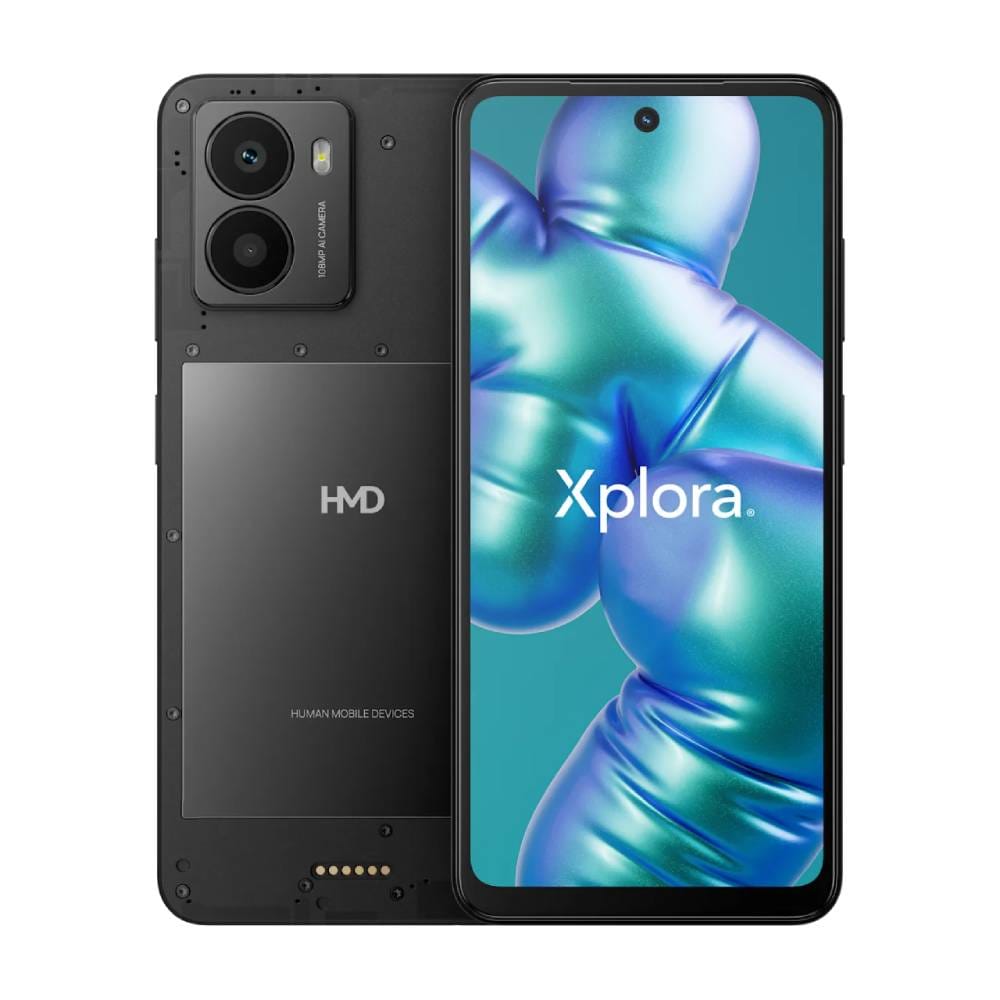
The HMD Fusion X1 is a smartphone designed for kids. Built in partnership with Xplora (a kids-tech brand), it puts safety first. Out of the box it has zero social media or browser apps – parents add each app later, so there are no surprises[7]. You control the X1 through the Xplora Guardian app: you can block or allow apps instantly, set daily limits, and even schedule a “School Mode” to disable games during homework. The Fusion X1’s standout features are its robust safety tools: set up to 10 GPS-based safe zones (home, school, etc.) with instant alerts, and restrict calls/texts to a trusted contacts list[8]. The phone includes a free Xplora Guardian subscription for these features (around €4.99/month).
Hardware-wise, Fusion X1 is solid for kids. It has a 6.56-inch LCD (90Hz) and a 5000 mAh battery, so it easily lasts a day. Its cameras are unusually high-res: a 108 MP rear shooter and a 50 MP front camera. There are also “Smart Outfits” (snap-on accessories) like an LED ring light for brighter selfies and game-controller cases for gaming. Importantly, Fusion X1 is repairable: you can replace the screen or battery at home without special tools[9]. This boosts durability over time. The phone runs Android 14, and while HMD hasn’t promised many years of updates, the emphasis is on controlled use rather than cutting-edge specs.
Why this pick:
✅ Pros: Extremely strong parental controls built in – apps are blocked by default and parents approve each one. Real-time location tracking with safe zones and call/text limits to trusted contacts. Durable modular design with replaceable parts.
⛔ Cons: More expensive (~£200+) than a basic phone, and requires a (paid) subscription for full features. The high-res camera is more about fun modes; image quality isn’t class-leading.
Main standout feature: Its all-in-one safety suite. Nothing else on the market offers this level of control: from zero-installed apps to safe zones and school mode, the Fusion X1 is built so parents can customize exactly what a child can do.
Who it’s best for: Younger children or pre-teens whose parents want maximum oversight. The Fusion X1 is perfect if you want to give a child a smartphone experience on your terms – you decide the apps, contacts and times of use. It’s less about top-end performance and more about giving parents peace of mind.
Comparison Table:
|
Feature |
Samsung A17 5G |
Google Pixel 9a |
HMD Fusion X1 |
|
Best for |
Everyday first phone use (calls, apps, photos) |
Older teenagers needing performance, camera quality and strong
security |
Younger kids where parental oversight matters most |
|
Typical age |
8–16 years (kids to early teens) |
~12+ years (teens with growing independence) |
6–12 years (tweens/kids) |
|
Parental controls |
Samsung & Google Family Link support |
Google Family Link support (Digital Wellbeing) |
Built-in Xplora parental suite (screen time, app whitelisting) |
|
Location safety |
Family Link location sharing |
Google Find My Device / Family Link location |
Xplora live tracking, 10 safe zones & alerts |
|
Screen time |
Family Link time limits; Samsung Kids mode |
Family Link schedules/limits |
Focus/school mode + remote screen-time control |
|
App restrictions |
Block apps via Family Link or Samsung Kids |
Approve/restrict via Family Link |
All apps blocked by default; parent approves each |
|
Battery life |
5000 mAh – easily a full day |
5100 mAh – 30+hr day (Extreme Saver to 100hrs) |
5000 mAh – easily a full day |
|
Durability |
Plastic body, IP54 splash-resistant |
IP68 water/dust resistant, Gorilla Glass |
Plastic matte body, designed for at-home repairs |
|
Display |
6.7″ LCD, 720p (large & bright) |
6.3″ OLED, 1080p, smooth 60–120Hz |
6.56″ LCD, 720p, 90Hz |
|
Camera |
Triple cam: 50MP main + 5MP ultra + 2MP macro |
Dual cam: 48MP main + 13MP ultrawide |
108MP main + 2MP depth, 50MP front |
|
Updates & support |
6 OS upgrades, 6 years of security |
7 years OS & security patches |
Android 14 (update policy not disclosed) |
|
Setup ease |
Create child account + Family Link apps |
Use Google Family Link |
Use Xplora Guardian app on parent’s phone |
|
UK buyer profile |
Value-conscious families (budget/needs) |
Tech-savvy teens or parents wanting Google updates |
Parents prioritizing safety over cost/brand |
Samsung Galaxy A17 5G → Check Price on Amazon UK
Google Pixel 9a → Check Price on Amazon UK
HMD Fusion X1 → Check Price on Amazon UK
What to Consider Before Buying a Phone for Kids or Teenagers
Child’s age and maturity: A younger child (under ~12) may need very strict controls and a simpler phone, while a mature teen can handle more freedom (but still needs guidance).
Parental controls & screen time tools: Look for phones compatible with apps like Google Family Link or built-in “Kids Mode” that let you block apps, set time limits and filter content. Decide in advance what rules you’ll enforce and choose a phone that supports them.
Location sharing & emergency contact: A smartphone (not a basic phone) lets you use GPS tracking and emergency SOS apps. Make sure you set up trusted contacts and know how to use the phone’s emergency features.
App store restrictions: On Android, you can lock the Google Play Store or require approval for installs. Use these to prevent children installing unsuitable apps or games.
Social media & messaging: Discuss what apps are allowed. Phones like the Fusion X1 start with no social apps installed – you add them as the child proves responsible. This helps avoid surprise downloads.
Battery life for school days: Kids often have limited access to charging at school. Ensure the phone has a big battery (one of these picks lasts over a day with normal use).
Durability and cases: Even with moderate use, phones can get dropped. Choose a sturdy model or invest in a robust case and screen protector. Some phones (like Fusion X1) have user-replaceable parts for longer life[10].
Budget & replacement cost: Remember your tolerance for the phone being lost or damaged. The Galaxy A17 5G is cheapest (~£150), so it’s easier to replace. The Fusion X1 and Pixel 9a cost more, so consider insuring or buying a cheaper model if needed.
Android vs iPhone: This guide focuses on Android. (iPhones have their own Family Sharing and Screen Time, but are more expensive.) Our picks work with UK services and Amazon UK availability.
Storage needs: Kids may take lots of photos or download apps. A phone with at least 64–128 GB internal storage (like these picks) is recommended. The A17 5G and Fusion X1 also include microSD slots for extra storage.
Software updates: A phone that still gets security patches is important for safety. Both Samsung and Google provide multi-year support (see specs above), ensuring the device isn’t left vulnerable.
UK pricing and returns: We’ve chosen phones sold in the UK (Amazon UK, etc.). Check Amazon UK for current pricing and official sellers. Amazon’s 30-day returns can be useful if the phone isn’t a good fit.
Frequently Asked Questions
What age is best for a child’s first phone?
There’s no strict rule – many parents wait until secondary school (~11–13 years old) or when a child becomes more independent. Consider the child’s maturity: can they follow rules? If you do get one earlier, a model with very limited features (like the Fusion X1) can act as a trial phone under close supervision.
Should I buy a smartphone or a basic phone?
Generally, a smartphone is preferable even for younger kids because it supports GPS tracking, parental-control apps, and emergency features. A basic phone might block apps entirely, but it also means no easy way to contact or locate your child if needed. Our picks are all smartphones with parental controls, giving a balance of safety and functionality.
Are Android phones good for parental controls?
Yes. Android offers robust tools: Google’s Family Link lets you manage multiple kids’ accounts (set app limits, screen time, filters, and track location). Samsung devices add their own Kids Mode. These tools are free and easy to use on Android phones. (iPhones have similar features, but they’re more expensive.)
Which phone of these three is best for most families?
For broad family use, the Samsung Galaxy A17 5G is our top recommendation. It hits the sweet spot of price and features: big battery and screen, decent camera, and Google/Samsung parental tools. The Pixel 9a is great if you want higher performance and the best software support, and the Fusion X1 is ideal if you need really tight parental control for a younger child.
Final Verdict
Samsung Galaxy A17 5G is the best overall first phone for kids and teens, offering a large display, all-day battery, and Android’s family controls at a budget price → Check price on Amazon UK
Google Pixel 9a is the best secure Android phone for older teenagers who need strong performance, top-notch camera features and a very long update period → Check price on Amazon UK
HMD Fusion X1 is the best parent-control option for younger kids, with built-in safety tools (app management, safe zones, trusted contacts) and a durable, repairable design → Check price on Amazon UK
Thank you for reading!
- ChoiceWise Team