Easy Smartphones for Seniors (UK 2026) – Big Screens, Simple Features & Reliable Everyday Use
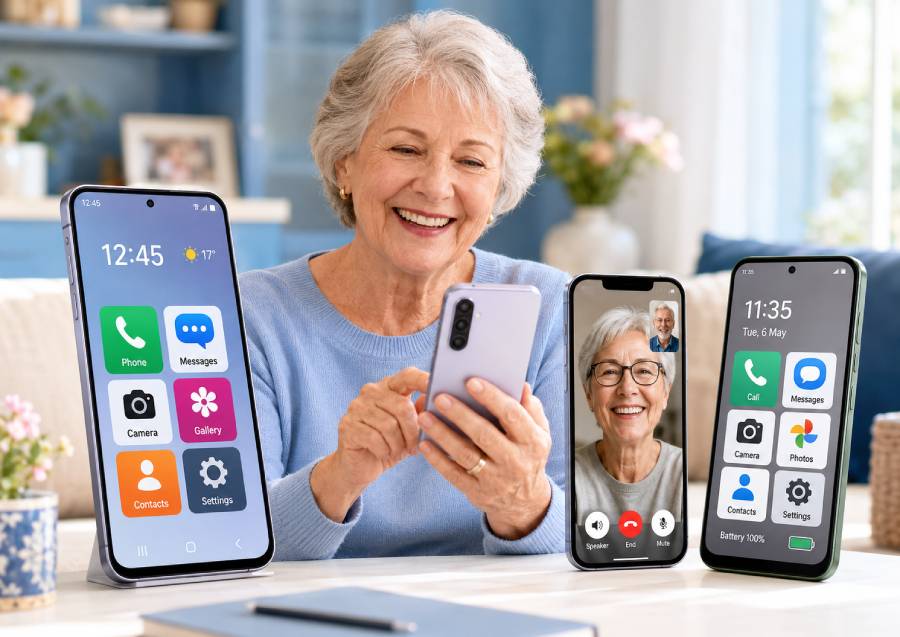
Reviewed for ease of use, screen size, battery life, accessibility features & value – updated 2026
🥇 Samsung Galaxy A36 5G – Best overall easy smartphone for seniors → Check price on Amazon UK
🥈 iPhone 16e – Best simple iPhone for seniors → Check price on Amazon UK
🥉 Motorola Moto G56 5G – Best durable budget phone for seniors → Check price on Amazon UK
👉 Scroll down to see full reviews and Amazon UK links
Introduction
Choosing a smartphone for older users or grandparents is different from a general buyer’s guide. Seniors often need a large, clear display and a simple interface rather than the latest bells and whistles. They value easy menus, clear text, loud and reliable calls, long battery life and strong long-term support. Modern phones also offer built‑in accessibility features like bigger text, voice assistants and emergency tools that matter more to seniors. Importantly, the easiest phone isn’t always the cheapest – cutting-edge battery or display tech can make daily use simpler and more reliable.
In this UK-focused guide we’ve hand‑picked three phones (all current models in 2025/2026) that balance big screens with simplicity and support. We considered screen size, one‑handed reach, call and speaker quality, accessibility settings (like larger fonts and magnifiers), plus durability and software updates. Our top three (Samsung Galaxy A36 5G, Apple iPhone 16e and Motorola Moto G56 5G) are all available new on Amazon UK. Each offers a straightforward experience tailored to everyday tasks: calls, messaging/WhatsApp, video chats, photos and basic browsing.
Below, we explain what to look for in a senior‑friendly phone, then give in‑depth reviews of our three picks. We focus on UK pricing and support (long warranties and updates) so you can feel confident choosing the right easy‑use smartphone.
What Makes a Great Smartphone for Seniors in 2026
Large, bright display: A bigger screen with high brightness makes text and icons easier to see. Phones like these typically use at least 6 inches with Full HD (1080p) or better. High contrast and good sunlight visibility (e.g. “high brightness mode”) help when reading or video calls outdoors[1].
Easy-to-use interface: A clean, simple home screen and menu layout is key. Both Android (One UI or stock Android) and iOS can be adjusted to show fewer buttons or larger icons. Voice assistants (Bixby, Google Assistant or Siri) can dial numbers or send messages by voice. Having a single‑button (or gesture) back/home navigation helps avoid confusion.
Clear call quality & loud speaker: Senior users need to hear and be heard clearly. Phones with stereo speakers or high‑quality earpiece audio improve voice calls and hands‑free video chats. For example, users note the iPhone 16e’s speakers are surprisingly strong for its size. Hearing‑aid compatibility (e.g. MFi on iPhone, or a “hearing aid” mode on Android) is also helpful.
Long battery life: A big battery (around 5000 mAh or more) can last well over a day of typical use. All three picks here boast very large cells (around 5000 mAh). Look for “long video/playback hours” or battery life claims (Samsung claims ~29h video playback; Motorola promises all-day on 5200 mAh). Fast charging is a bonus for quick top-ups.
Simple security: Ease of unlocking is important. Fingerprint readers (often built into the power button or under the screen) and Face ID (front‑camera facial recognition) are faster than typing a PIN. The iPhone 16e uses Face ID; the Samsung and Motorola have one‑touch fingerprint sensors. Biometric unlocks are preferable to PINs for most seniors.
Accessibility features: Phones today include features like larger default text (Display Zoom on iOS, or “Text and display” size on Android), screen magnifiers, high‑contrast modes, and screen readers (VoiceOver on iPhone, TalkBack on Android). Voice assistants can read or announce on-screen info. All picks support these, with iPhone noted for excellent VoiceOver performance. Also important: an emergency SOS mode or button (iPhone supports SOS via satellite and fall detection, Samsung has emergency message options).
Durability & water resistance: Seniors often want a phone that survives minor drops or splashes. These models have tough glass and IP-rated water resistance. The Galaxy A36 5G has Gorilla Glass Victus+ and an IP67 rating. The iPhone 16e has Ceramic Shield and IP68 rating. The Moto G56 5G is built to military-specs (MIL-STD‑810H), IP68/IP69 for dust/water, and Gorilla Glass 7i, making it extra tough.
Long software support: Seniors may keep a phone longer, so years of OS and security updates are vital. Samsung promises 6 Android version upgrades on the A36 5G. Apple generally supports an iPhone for 6–7 years; the 16e launched on iOS 18 and supports iOS 26. Motorola’s G-series usually gets at least 2–3 years of Android updates (and regular security patches), which is good for this price range.
UK price & value: Finally, cost matters. We chose affordable mid-range phones without excess cost. All are available new on Amazon UK with reliable service and easy returns. Their value (high quality for price) is part of the recommendation – e.g. Galaxy A36 5G and Moto G56 5G offer top battery and features for modest prices, while the iPhone 16e is Apple’s budget-friendly model with flagship‑level chips.
Top 3 Smartphones for Seniors (UK 2026)
1. Samsung Galaxy A36 5G – Best overall easy smartphone for seniors
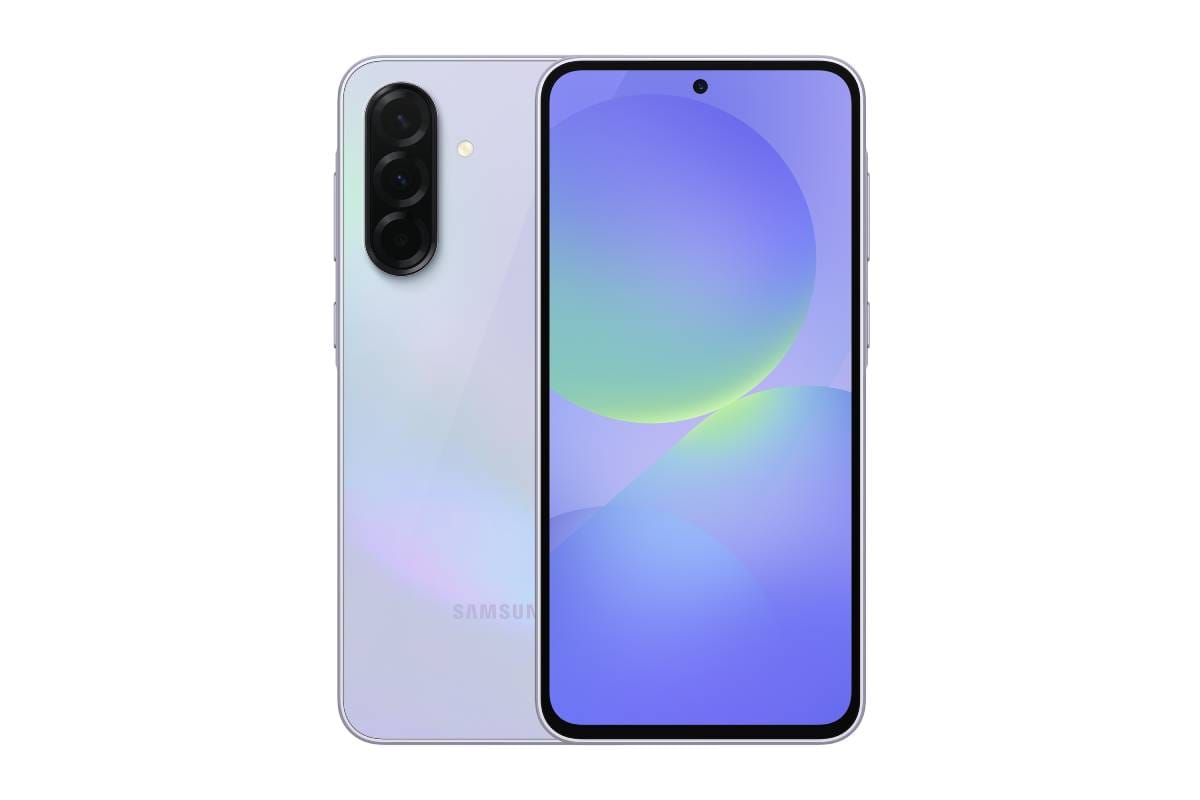
A balanced mid-range Android phone with a big screen and strong battery makes the A36 our top pick. It offers the familiar Samsung One UI layout, a large 6.7‑inch AMOLED display (120Hz refresh, up to 1200 nits peak) for sharp text and video, and a huge 5,000 mAh battery with 45W fast charging. The sturdy build (Gorilla Glass Victus+, IP67 water/dust resistance) helps protect it from accidents. Samsung even guarantees 6 generations of Android updates, meaning years of new software[2].
For seniors, the Galaxy A36 5G shines in everyday tasks: the bright screen and adjustable font size make reading easy, and Samsung’s interface can be simplified (big icons, a simple home screen). Call quality is very good, with clear sound in tests. The phone has dual cameras (50MP main + 8MP ultrawide) which take good point‑and‑shoot photos automatically. It has a side-mounted fingerprint reader for quick unlock. Accessibility features include Samsung’s built‑in voice assistant and screen reader, plus hearing aid compatibility. The One UI is modern but straightforward, and new users typically adapt quickly[3].
Why this pick: It combines a large, bright display and long battery with a user-friendly Android interface. The Galaxy A36 5G is well supported (6 years of security patches) and built tough – ideal for seniors wanting a reliable, do‑everything phone.
✅ Pros:
- Big 6.7" 120Hz Super AMOLED screen (1200 nits) makes text/videos clear
- Massive 5,000 mAh battery (about 29h video) with 45W charging
- Durable design: Gorilla Glass Victus+, IP67 water‑resistant, 6yr software support
⛔ Cons:
- Only dual cameras (no telephoto) and no wireless charging (wired-only fast charge).
Main standout feature: The combination of a huge, bright display and very long battery life is the A36’s highlight. It means seniors can read, watch or video-call all day without recharging.
Who it’s best for: Seniors who want a straightforward Android phone with a large screen and top-notch battery. Also great for family hand-me-downs, since Samsung’s interface is easy to customise (big text/icons) and it plays nicely with other Samsung devices.
Amazon UK Check: 👉 Check price on Amazon UK – a great value Android phone that covers all the basics seniors need (screen, battery, simple UI) reliably.
2. Apple iPhone 16e – Best simple iPhone for seniors
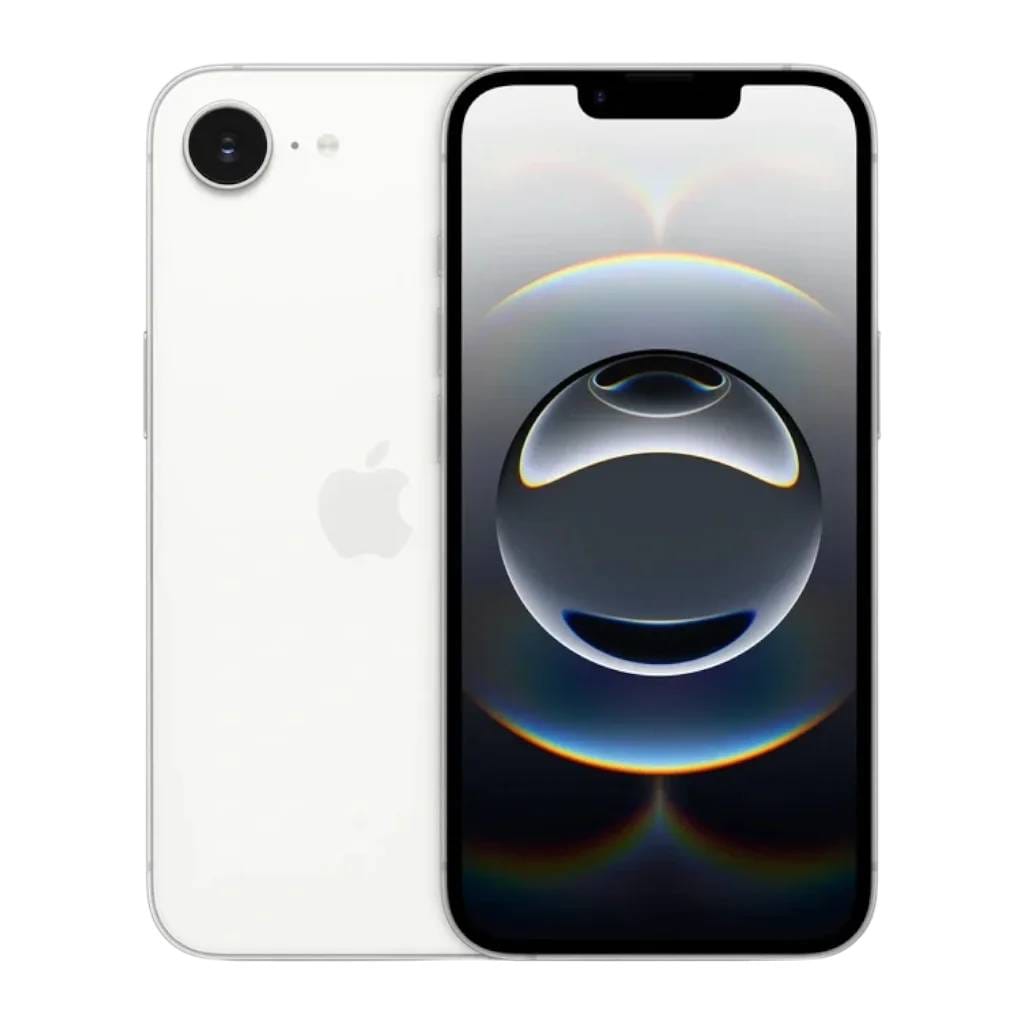
If you prefer Apple’s ecosystem, the iPhone 16e is a perfect entry‑level iPhone for seniors. It offers the familiar iOS experience at a lower cost. The 16e has a 6.1-inch Super Retina OLED display (edge‑to‑edge with Face ID notch) that looks crisp and supports Display Zoom (for larger text). Apple’s Face ID unlock is quick and secure, and the phone’s speakers are excellent – reviewers note they’re better even than on pricier iPhones. In fact, one accessibility reviewer found the 16e’s audio better at both high and low volume than higher-end models[4].
The iPhone 16e packs the same A18 chip as the flagship models and Apple’s new C1 modem, giving snappy performance for all apps. Battery life is outstanding for a 6.1-inch phone – Apple claims up to 6 hours longer video playtime than an iPhone 11, and tests show roughly 26 hours of video playback. It’s designed to last: IP68 water/dust protection and Ceramic Shield glass keep it safe in spills or drops. Like all iPhones, it will get iOS updates for many years (currently up to iOS 26).
Why this pick: The iPhone 16e delivers a very simple, polished experience. Seniors familiar with older iPhones (or whose family uses iPhones) will find it intuitive. FaceTime video calls and iMessage are top-notch on iOS. Accessibility is excellent: VoiceOver (screen reader) and Siri work very well, and there’s Display Zoom for big text, plus emergency SOS functions (e.g. Satellite SOS). It’s essentially a modern iPhone SE, optimized for ease of use and longevity.
✅ Pros:
- Intuitive iOS with Face ID, long update support (many years of iOS).
- Bright 6.1" OLED display, very good speakers (improved bass) and excellent camera (48MP Fusion camera).
- Durable: IP68 water/dust proof, Ceramic Shield glass and wireless charging (Qi).
⛔ Cons:
- Higher price for its class; lacks MagSafe and ultra-wide camera (only 48MP wide lens).
Main standout feature: Apple’s combination of ease and reliability. The 16e feels very familiar and runs apps smoothly. Face ID works every time and the device integrates tightly with services like FaceTime/WhatsApp, which is great for keeping in touch.
Who it’s best for: Seniors in an Apple household or those upgrading from an older iPhone. Also ideal for anyone who wants an iPhone with modern features (OLED screen, AI chip) but doesn’t want to pay flagship prices.
Amazon UK Check: 👉 Check price on Amazon UK – the 16e is Apple’s affordable 2025 model, with premium build and years of software support. It’s the simplest way to get a long-lasting iPhone experience for seniors (FaceTime calls, apps, emergency SOS).
Check our website: for more details about Apple iPhone 16e
3. Motorola Moto G56 5G – Best durable budget phone for seniors
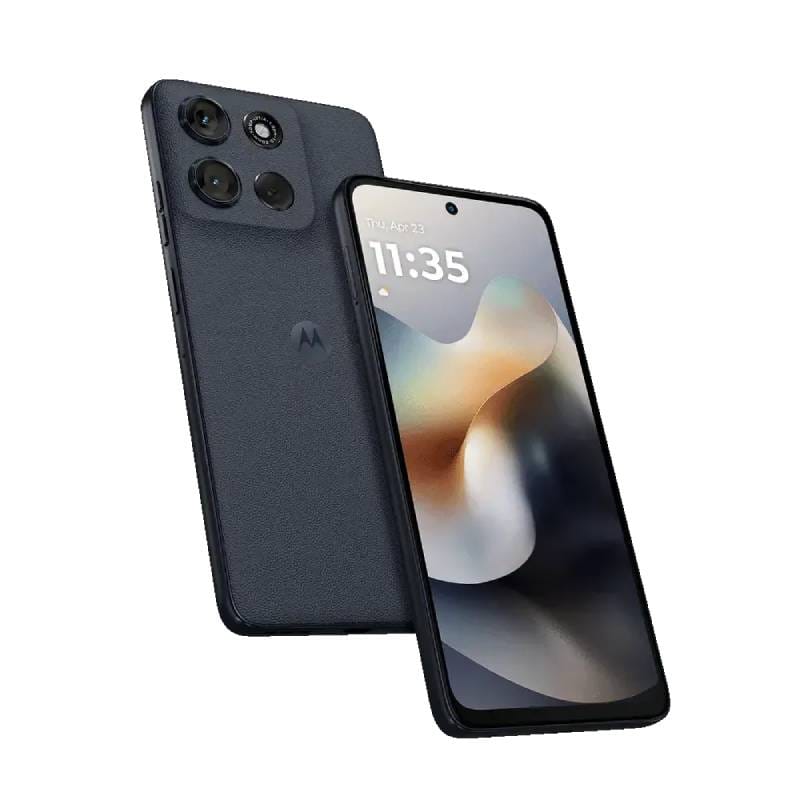
For a no-frills Android on a budget, the Moto G56 5G delivers a big screen and top durability. It sports a 6.7‑inch FHD+ display (bright and notchless) and stereo speakers with Dolby Atmos, making videos and calls easy to see and hear. The 5200 mAh battery easily lasts a full day (Motorola says “all-day use”) and supports 30W fast charging. Performance is adequate (a 2.6 GHz octa-core chipset with 5G support), and there’s plenty of storage (up to 256GB + microSD) for photos or WhatsApp chats.
Where the Moto G56 really stands out is toughness. It’s built to military standards (MIL-STD 810H tested), has IP68/IP69 water‑dust protection, and a Gorilla Glass 7i screen. In simple terms, this phone can handle being dropped or getting splashed better than most. The Android interface (My UX) is essentially stock Android, which means no bloatware and straightforward settings. Plus, Motorola adds helpful gestures (twist for camera, double chop for flashlight) which can be handy shortcuts.
Why this pick: It’s the best choice for seniors who need a rugged, reliable phone on a budget. The big screen and clean Android make basic tasks easy, and you won’t have to worry much about damage from drops or water. It’s also 5G‑ready, so it should stay useful if networks change.
✅ Pros:
- Huge 6.7" FHD+ display with high brightness for outdoor viewing and Dolby Atmos stereo speakers.
- Massive 5200 mAh battery (all‑day use) with TurboPower 30W charging.
- Very tough: IP68/IP69 water resistance, military-grade durability (16 MIL‑STD tests) and Gorilla Glass 7i screen.
⛔ Cons:
- Motorola promises only about 2 years of Android updates (versus 6 years on Samsung) and no brand‑name apps.
Main standout feature: Durability. The Moto G56 is designed to survive life’s bumps and spills. IP68/IP69 rating and military‑grade glass mean seniors can use it worry-free, even around water or if it slips from a pocket.
Who it’s best for: Buyers who want the biggest screen and battery for the lowest price, and need extra toughness. Great for an active grandparent, or anyone who treats their phone roughly. Also good if simplicity is key – it’s essentially stock Android, so minimal clutter.
Amazon UK Check: 👉 Check price on Amazon UK – Motorola’s G56 5G offers one of the best battery/screen combos for the budget, plus military‑grade durability. It’s ideal for seniors on a budget who want a big easy phone that lasts through the day and drops.
Comparison Table: Senior-Friendly Features
|
Feature |
Samsung Galaxy A36 5G |
iPhone 16e |
Moto G56 5G |
|
Display size |
6.7″ FHD+ Super AMOLED (120 Hz) |
6.1″ OLED (Super Retina XDR) |
6.7″ FHD+ LCD (bright, notchless) |
|
Ease of use |
One UI 7 (Android 15/16), customisable large icons |
iOS (Face ID, simple home screens) |
Near-stock Android 15 (My UX), gesture shortcuts |
|
Accessibility |
Large text, magnifier, Bixby/Google Assistant, HAC |
VoiceOver screen reader, Zoom, Siri, MFi support |
TalkBack screen reader, large text, gesture, live caption |
|
Battery life |
5000 mAh (~29h video playback) |
“Up to 26h video playback” |
5200 mAh (all-day use) |
|
Call & speaker |
Stereo speakers; clear call sound |
Excellent speakers; FaceTime HD |
Stereo speakers (Dolby Atmos); good call mic |
|
Camera simplicity |
50MP main + 8MP ultrawide (auto HDR, 4K video) |
Single 48MP wide (Fusion), very easy point & shoot |
50MP main + 8MP ultrawide + 32MP selfie, simple auto AI |
|
Durability/waterproof |
Corning Gorilla Glass Victus+; IP67 |
Ceramic Shield front; IP68 |
Gorilla Glass 7i; IP68/IP69, MIL-STD toughness |
|
Unlock method |
Side fingerprint or PIN |
Face ID (Face unlock) |
Side fingerprint (power button) |
|
Software updates |
6 years Android upgrades & security |
~6+ years iOS updates (16e supports iOS 26) |
~2–3 years Android + security patches |
|
Best senior-friendly strength |
Balance of big screen & battery with simple One UI |
Intuitive iOS simplicity & long-lasting support |
Unbeatable durability and battery life |
|
Best for |
Seniors wanting a large-screen Android with strong battery and
support |
Seniors who prefer iOS/FaceTime and long-term updates |
Seniors on a tight budget needing rugged reliability |
|
Typical UK buyer profile |
Older Android switchers or families (Big screen + features) |
Apple-focused households, iPhone upgraders |
Budget-conscious users needing a tough, simple phone |
Samsung Galaxy A36 5G → Check Price on Amazon UK
iPhone 16e → Check Price on Amazon UK
Motorola Moto G56 5G → Check Price on Amazon UK
What to Consider Before Buying a Smartphone for Seniors
Screen size and readability: Aim for at least 6.1–6.7 inches. Check that text can be enlarged and the phone’s font is clear. High-contrast themes (dark text on light background) improve visibility. For very poor vision, phones with built-in magnifier apps are helpful.
Simple home screen layout: Look for phones that allow a simplified launcher or large “Easy mode”. Android phones often have a “Simple UI” mode and iPhones can use Zoom. Placing favorite contacts or apps on the main screen helps seniors get started quickly.
Familiar operating system: Consider what the user already knows. An Android phone will feel different from an iPhone. If they’ve used an iPad or family has iPhones, the iPhone 16e makes more sense. If they know Samsung or Google, stick with Android. Both platforms have voice assistants for easy voice commands.
Battery life and charging: A long-lasting battery avoids mid-day panics. If the user has trouble plugging in wires, wireless charging (iPhone Qi) is convenient, though keep in mind costs. A larger battery (5000 mAh+) and fast charging means less daily hassle.
Call volume and speaker quality: Check if the phone supports hearing aids or has an option for “enhanced audio”. Try calling a friend or using speakerphone to ensure volume is loud enough. Some phones (like the iPhone 16e) have notably rich sound even at low volume[4].
Emergency features: Many phones let you quickly call emergency contacts by pressing the power button or using an “SOS” mode. Both Android and iOS have emergency SOS with location sharing. The iPhone 16e even supports satellite SOS for remote situations. Ensure the phone’s emergency contact setup is done.
Accessibility settings: In settings, look for options like Display & Text Size (Android and iOS) to make buttons/text bigger. Voice or gesture navigation can simplify use. For hearing support, iPhones work with MFi hearing aids; Android phones may have “Hearing Aid” settings or headphone impedance options. Check if the phone supports subtitles or captioning in calls/media if needed.
Camera simplicity: Seniors often just want easy photo snapping. All three picks auto-enhance photos. Avoid phones with many tricky camera modes. The Galaxy A36 and Moto G56 give one-tap HDR and night modes. The iPhone’s single-lens 48MP camera automatically handles zoom through its Fusion sensor (so no mode-switching needed)[5].
Storage and apps: Ensure there’s enough storage (at least 64GB) for photos and videos. The Moto G56 even has a slot for extra SD card space. Seniors who use WhatsApp or take lots of pictures will benefit from ample memory.
Durability and grip: Look for a case or built-in grip if hands are shaky. Out of our picks, the Moto G56 and Galaxy A36 have very rugged builds. All three have water resistance (IP67/68) to protect against spills.
Price and local support: In the UK, buying from Amazon UK or reputable retailers ensures easy returns or warranty service. Check if the phone is covered by a UK warranty. Also compare current prices – sometimes a new model can drop in price quickly.
Frequently Asked Questions
Which smartphone is easiest for seniors to use?
Generally, a phone with a large display and a simple interface is best. Between our picks, the Samsung Galaxy A36 5G is very easy with its big screen and clear menus, while the iPhone 16e is easy if the user is used to Apple’s ecosystem (with Face ID unlocking and large text). The Moto G56 5G is also straightforward, but it’s chosen more for durability than simplicity. In short, the best one depends on whether the user prefers Android or iOS.
Is an iPhone or Android phone better for seniors?
Both can be senior-friendly. iPhones (like the 16e) have a consistent, simple layout and many built-in accessibility options (VoiceOver, etc.), plus very long update support. Android phones (like the A36 or G56) offer more customization (e.g. simple launchers, big “Easy mode” settings) and sometimes bigger screens at a lower cost. It often comes down to familiarity: go with the platform your senior or their family is comfortable with.
What screen size is best for older users?
Usually 6 inches or larger. Our top picks all have around 6.7 inches (Samsung and Moto) or 6.1 inches (iPhone 16e) which is still roomy. The key is large text; on any phone you can enlarge fonts. Many seniors find 6.5–7 inches ideal because it’s easier to see and tap.
Do seniors really need a 5G phone?
5G is not a must-have for seniors, but all our picks support 5G as standard, which future-proofs the device. 5G networks may offer faster video call quality or streaming in future. However, for basic calling and messaging, 4G is usually sufficient. If budget is tight, the 5G model often comes at little extra cost nowadays, so it’s fine to choose it for future resale value.
Which phone is best for most seniors?
For a very broad recommendation: the Samsung Galaxy A36 5G wins as the “best overall” here – it balances a large, easy screen with long battery life and is very simple to use. But if the senior loves Apple, the iPhone 16e is unbeatable for its simplicity and FaceTime support. The Moto G56 5G is best if durability and budget are top concerns.
Final Verdict
Samsung Galaxy A36 5G – best overall choice for seniors who want a large screen, easy Android experience, good battery life and strong everyday value → Check price on Amazon UK
iPhone 16e – best simple iPhone for seniors who prefer iOS, FaceTime, long-term updates and a familiar Apple experience → Check price on Amazon UK
Motorola Moto G56 5G – best durable budget option for buyers who want a simple Android phone with a big screen, strong battery and practical everyday reliability → Check price on Amazon UK
Thank you for reading!
- ChoiceWise Team