Best Phones for AI Voice Notes & Meeting Transcription (UK 2026) – Record, Summarise & Search Conversations Faster
A practical UK comparison of the Samsung Galaxy S26, Apple iPhone 17e and HONOR Magic V6 for capturing, transcribing and reviewing spoken information.
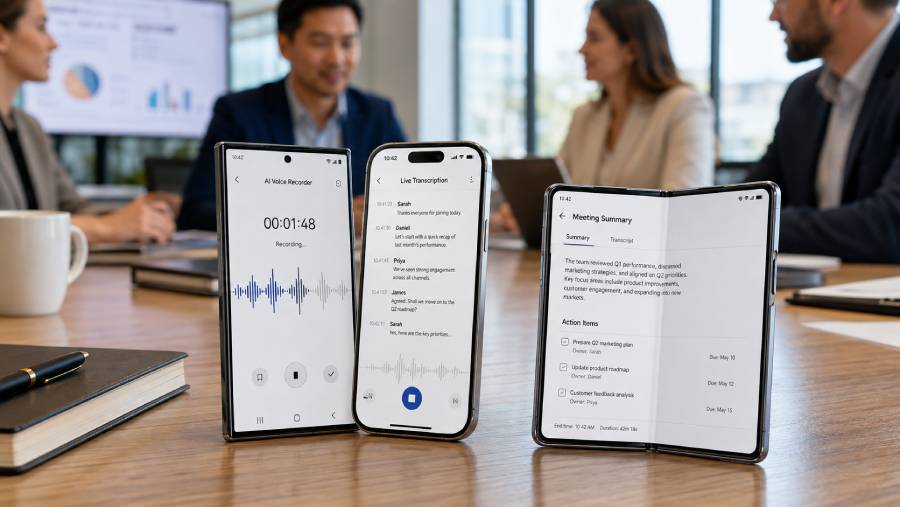
Quick answer: the Samsung Galaxy S26 is our strongest overall choice if you want a compact Android phone with a clearly documented recorder-to-transcript-to-summary workflow. The main exception is for Apple users who want transcription to appear while recording inside Notes: the iPhone 17e fits that ecosystem better. The HONOR Magic V6 has the best screen for reviewing long transcripts, but its UK materials do not verify the same complete native transcription workflow.
🥇 Samsung Galaxy S26 — Best compact-value choice for Samsung's native transcription tools — Check price on Amazon UK
🥈 Apple iPhone 17e — Best iPhone option for Apple Intelligence and third-party transcription apps — Check price on Amazon UK
🥉 HONOR Magic V6 — Best foldable alternative for AI-assisted productivity and multitasking — Check price on Amazon UK
Updated for 2026: continue for detailed workflow differences, limitations and UK purchase checks.
Introduction
This guide is for UK buyers who regularly turn spoken information into something usable: searchable voice notes, interview transcripts, lecture summaries, action lists or permitted meeting records. The difficult part is no longer simply finding a phone with a microphone and recorder. The real question is what happens after recording. Can the phone produce text without an awkward chain of apps? Can you search that text, copy it into a document, identify important points and review the result comfortably? Just as importantly, what conditions must be met before the promised AI features work?
The best phones for AI voice notes and meeting transcription therefore cannot be ranked on processor speed alone. Samsung documents a dedicated workflow that starts in Voice Recorder and continues through transcription and summarisation. Apple places recording and searchable transcription inside Notes, with Apple Intelligence available for summaries when its requirements are met. HONOR supplies a much larger foldable workspace and useful meeting-related productivity features, but its UK Magic V6 page does not clearly confirm a complete native record-to-transcript-to-minutes sequence. That distinction matters more than a generic “AI phone” label.
Every transcript also needs human checking. Crosstalk, strong accents, distant speakers, room echo, product names and specialist terminology can all alter the result. A generated summary may omit a qualification or turn a tentative suggestion into what looks like a firm decision. These phones should be treated as capture, recall and drafting tools—not as automatic creators of authoritative minutes.
We selected exactly three 2026 models with distinct buyer roles: a compact Samsung, an accessible route into Apple's current ecosystem and a productivity-focused foldable.
What to consider before buying
Before comparing hardware, decide what your recording routine actually looks like. A person capturing thirty-second ideas has different requirements from someone who records hour-long interviews and then spends another hour correcting names and extracting actions.
- Decide where your notes should live. Samsung's documented route starts with Voice Recorder and can continue into Samsung Notes. Apple's route records audio directly in Notes, where the transcript can be searched, copied or added to the written note [3][7]. If your existing projects already live in one of these ecosystems, avoiding repeated exporting may be more valuable than gaining a larger screen.
- Separate live transcription from post-recording transcription. Apple documents transcription while recording audio in Notes. Samsung's published process is to save the recording, select it and then choose Transcribe [3][7]. Live text can help you notice missed information during a session; post-processing is perfectly suitable when your priority is capturing first and reviewing later.
- Check feature prerequisites. Device language, supported transcription language, software version, account status and downloaded language resources can affect availability. Samsung says a Samsung account is needed for the summary function, while Apple separates the requirements for basic Notes transcription from those for an Apple Intelligence summary [3][7]. Check the current support pages against your language and intended workflow before purchasing.
- Plan for storage and retention. Keeping the original audio alongside every transcript consumes more storage than retaining text alone. The iPhone 17e begins at 256GB, and Samsung lists 256GB and 512GB S26 configurations [2][6]. Capacity helps, but it is not a privacy policy. Decide which recordings will be retained, where encrypted backups belong and when old audio should be deleted.
- Understand recording permission. A phone being technically capable of recording does not make every recording appropriate. For organisational recordings, the ICO advises having a valid purpose and lawful basis, considering people's rights, and explaining the recording's purpose, intended use and retention in advance [11]. Follow employer, client, professional-sector and meeting-platform rules. This article is practical buying guidance, not legal advice.
- Budget for the complete setup. A third-party transcription service may have a subscription, storage allowance or its own data-handling terms. HONOR states that its Magic-Pen is sold separately and that the charger required for its stated maximum charging rate is not necessarily part of the basic phone purchase [9]. Include these extras when comparing value.
- Verify the marketplace transaction. Manufacturer warranty information does not tell you who is selling a particular Amazon listing or how a marketplace return will be handled. Confirm seller identity, fulfilment, condition, included accessories, returns and warranty support at checkout. This is particularly important if a listing mixes imported, refurbished and UK-specification stock.
What makes the best phones for AI voice notes and meeting transcription in 2026?
A coherent native workflow: “AI transcription” can describe several different abilities. The most useful phone combines easy recording, transcript generation, text search, copying or export and a summary tool with clearly stated requirements. Samsung's UK guidance explicitly connects Voice Recorder transcription with summaries and Notes. Apple documents recording, transcription, transcript search and summarisation inside Notes [3][7]. HONOR's UK Magic V6 page verifies meeting-aware and multitasking features, but it does not document an equivalent end-to-end transcription process [9].
Reliable access rather than an impressive feature list: A feature has little value if it does not support your working language, requires an unavailable service or disappears when an account is not configured. Check exact UK support documentation, not merely a launch presentation or the name of an AI assistant. Summary generation and basic transcription may also have different requirements on the same phone.
Useful handling of speakers and difficult audio: Meeting transcription is harder than dictating a memo in a quiet room. Several people may speak from different distances or interrupt one another. Samsung describes speaker recognition designed to capture the individual closest to the microphone, which is useful context but not a promise of flawless speaker attribution [3][4]. Whichever phone you choose, place it where voices can be heard clearly and correct names, figures and decisions before sharing the text.
A form factor matched to the work: Portability favours the 167g, 6.3-inch Galaxy S26; it is easy to carry and convenient for quick capture [1]. The conventional iPhone 17e remains manageable and keeps recordings beside other Apple Notes content. The 7.95-inch unfolded Magic V6 provides substantially more room for comparing a transcript with an agenda, browser, message thread or task list [9]. Decide whether you spend more time recording on the move or processing material afterwards.
Search, editing and destination matter as much as capture: A transcript becomes valuable when you can find a name days later, copy a quotation, extract an action or attach context. Apple's searchable Notes transcript is a particular strength for existing Notes users [7]. Samsung's ability to move the result into Samsung Notes supports a similar capture-to-organisation routine [3]. If you intend to use a separate transcription service, prioritise its export formats, account security and compatibility rather than assuming the handset itself controls every stage.
Realistic summary expectations: AI meeting summaries are drafts. Samsung explicitly says output quality can vary, and short recordings cannot always be summarised [3][4]. No model here has evidence of universally superior accuracy across accents, languages and noisy rooms. Retain source audio where permitted, compare critical passages with it and use your organisation's normal approval process for formal minutes.
Top 3 products worth buying – UK 2026
1. Samsung Galaxy S26 — Best compact-value choice for Samsung's native transcription tools
✅ Pros
- Samsung documents a clear Voice Recorder-to-transcript-to-summary workflow.
- Compact 6.3-inch, 167g design suits frequent carrying and quick voice capture.
- Choice of 256GB or 512GB provides sensible room for retained recordings.
⛔ Con
- The smaller display is less comfortable for extended editing of long, multi-speaker transcripts.
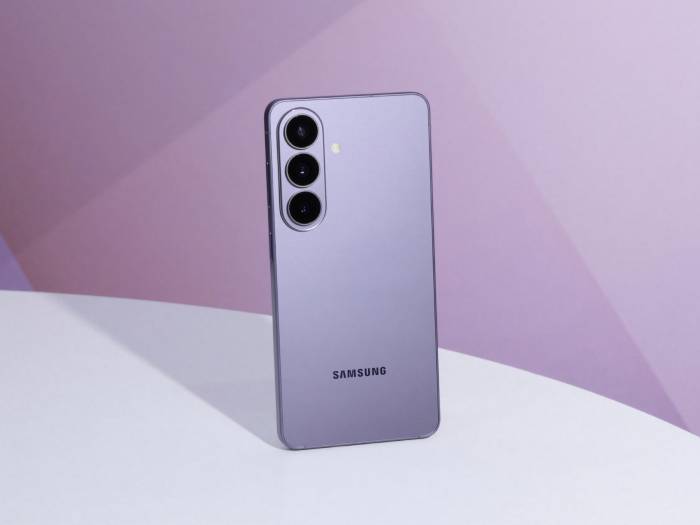
The Samsung Galaxy S26 is the strongest all-round recommendation here because its software path most directly answers the recorder-first buying brief. Samsung's UK Transcript Assist guidance explains that a user can record audio in Voice Recorder, select the saved file, tap Transcribe and then generate a summary from the completed transcription. It also connects the result with Samsung Notes and includes translation within the wider workflow [3][4]. That is easier to evaluate than a vague promise that an AI assistant might help with meetings.
There is an important qualification. The exact S26 UK support entry points owners towards Samsung's guidance for recording audio and converting speech to text, while Samsung presents the S26 family as part of its current Galaxy AI platform [5]. However, the standard S26 product page does not itself enumerate Transcript Assist by name. It is therefore sensible to check the current software and UK support information for the exact device before relying on the feature for work. The evidence is strong, but buyers should not mistake a supported workflow for a guarantee that every function will work in every language or configuration.
The process is also documented as an after-recording workflow. You capture the session first and ask the phone to transcribe the saved item afterwards. That is a good fit for voice memos, interviews and meetings where the priority is unobtrusive recording. It is less suitable than Apple's documented Notes route if you specifically need words appearing on screen as the session continues. This difference is practical rather than cosmetic: live text can help with accessibility or prompt an interviewer to clarify a term before the conversation ends.
Samsung places conditions around summarisation. The audio must be transcribed first, a Samsung account is required, and a recording can be too short to summarise [3][4]. Speaker recognition is described in terms of the person closest to the microphone, so it should not be sold as perfect diarisation for a large boardroom. In a group meeting, place the handset centrally where permitted, ask participants not to talk over one another and expect to correct speaker names. The phone can accelerate the first draft; it cannot know which ambiguous voice owns a commitment.
Hardware-wise, the S26 is the easiest of the three to carry. Samsung lists a 6.3-inch display, 167g weight and 4,300mAh battery, with 256GB and 512GB storage options [1][2]. The light body is useful if the phone doubles as an everyday pocket device and an always-available voice notebook. An independent UK review similarly found it unusually manageable for a flagship and fast in normal use, while warning that its smaller battery is less suited to especially intensive use than larger phones [13]. Long recording sessions should therefore begin with a sensible charge level rather than an assumption that compactness comes without an endurance trade-off.
The display is adequate for checking a summary, correcting a name or copying a few action points. It is less attractive for cleaning an hour-long transcript while comparing it with a presentation. Buyers choosing the S26 accept that compromise deliberately: capture and quick review are prioritised over a tablet-like editing workspace. If most transcript processing happens later on a laptop, that is an efficient balance. If the phone itself is your main document workstation, the HONOR's unfolded screen is much more comfortable.
Main standout feature: the most convincing element is not any single AI label but the documented sequence connecting Samsung Voice Recorder, transcription, summaries and Samsung Notes. It gives Android buyers a clear mental model of what they will do after a meeting. That clarity reduces reliance on a patchwork of unrelated apps, although current language support, account requirements and output quality still need checking.
Who it is best for: choose the Galaxy S26 if you want a compact Android phone for frequent voice notes, permitted interviews or meetings and you already use Samsung Notes—or are happy to adopt it. Avoid it if live on-screen transcription is essential or if you expect to perform extensive split-screen transcript editing entirely on the handset.
Samsung states that its UK smartphones have a 24-month manufacturer warranty against defects in materials and workmanship, subject to proof of purchase and its terms [12]. A particular Amazon transaction may follow a separate retailer or marketplace route, so check the live seller, condition, fulfilment, returns and warranty handling rather than assuming the manufacturer policy describes the listing.
2. Apple iPhone 17e — Best iPhone option for Apple Intelligence and third-party transcription apps
✅ Pros
- Notes can record live audio and produce searchable, copyable transcript text.
- Apple Intelligence can summarise recordings when its requirements are satisfied.
- 256GB starting storage is useful for retaining original audio beside transcripts.
⛔ Con
- Its conventional 6.1-inch display provides limited workspace for comparing long transcripts with other material.
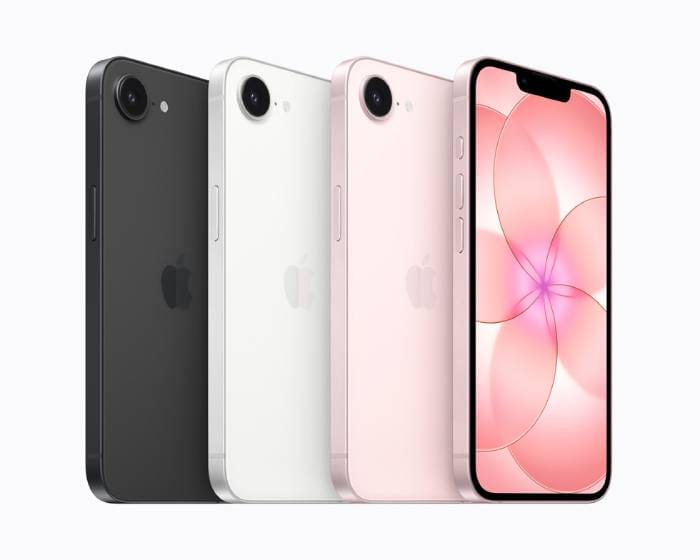
The iPhone 17e is more capable for native transcription than a simple “use a third-party app” description suggests. Apple's iPhone guide documents a complete basic Notes route: start recording live audio within a note, view spoken words as text, search the transcript, copy it or add it to the note, and use Apple Intelligence to summarise the recording when enabled [7]. Third-party transcription services remain available for specialist workflows, but they are not essential for straightforward capture, search and summarisation.
That integration is the iPhone's decisive advantage for buyers already organising work in Apple Notes and iCloud. A note can contain written context, the recording and searchable transcript rather than forcing the user to begin in a separate recorder and work out where the text should go afterwards. Imagine opening a client note, typing the agenda, recording the permitted discussion and then adding corrected actions below it. The benefit is organisational continuity, not a claim that Apple uniquely supports transcription.
Apple describes the transcription as occurring with live audio recording in Notes, creating a meaningful distinction from Samsung's documented record-first, transcribe-afterwards process [3][7]. Someone conducting an interview can watch the text emerge and identify obvious gaps while there is still time to repeat a name. That does not prove the transcript is accurate, and it should not encourage constant screen-watching during a sensitive conversation. It simply gives the user earlier visibility of what the phone believes it heard.
Apple says basic Notes audio transcription is available on iPhone 12 and later when the device language is set to a supported language, including English. The iPhone 17e is a 2026 A19 model running iOS 26 and supporting Apple Intelligence, so it fits the documented device route, subject to software, language and regional conditions [6][7]. Basic transcription and AI summarisation should still be treated as separate capabilities: the summary requires Apple Intelligence, while transcription has its own supported-device-language conditions. Apple describes Apple Intelligence capabilities with availability qualifications, so do not assume that every related feature works in every language or region.
The phone can also record supported Phone and FaceTime calls and place transcripts in Notes, with participants automatically notified when call recording starts [7]. That notification is a useful safeguard, not blanket permission. It does not replace the need to follow workplace policy, explain the purpose and retention of the recording or consider data-protection obligations. For room meetings, recording inside Notes is the more relevant workflow.
Apple launched the iPhone 17e in the UK in March 2026 with 256GB and 512GB storage options [6]. The 256GB starting point is useful for anyone keeping raw audio as well as text, and an independent UK review described the capacity as ample for most users while finding the A19 phone fast and its battery life strong [14]. The same review highlighted the more traditional, slower 6.1-inch display and limited hardware set compared with more expensive iPhones [14]. For this guide, the screen size is the more relevant compromise: it is fine for searching a phrase or correcting a short note, but lengthy transcript clean-up remains cramped.
Storage should not encourage indefinite retention. Audio can include personal information, commercial discussions and voices of people who never expected a permanent archive. Establish a deletion routine, use appropriate account security and check how any optional third-party transcription provider handles uploads, training, retention and account closure. No evidence reviewed for this guide establishes one universal on-device or cloud-processing rule for every transcript and summary action, so broad privacy slogans should be avoided.
Main standout feature: Apple's integrated Notes workflow keeps the live recording, transcript, search tools and surrounding written context together. For an established Apple Notes user, that can save more time than a larger screen or a longer AI feature list because there is less administrative work after every session.
Who it is best for: choose the iPhone 17e if you already work in Apple's ecosystem, want live Notes transcription and prefer a manageable conventional phone. It is also a sensible foundation for a separately assessed specialist transcription app. Avoid it if your priority is a large on-phone workspace for side-by-side transcript review or if your required language and Apple Intelligence feature availability have not been confirmed.
Apple's UK limited hardware warranty lasts one year from original retail purchase and sits alongside applicable UK consumer-law rights [8]. Check the actual Amazon seller, listing condition, returns route and warranty arrangements before buying; marketplace terms cannot be inferred from Apple's general warranty page.
3. HONOR Magic V6 — Best foldable alternative for AI-assisted productivity and multitasking
✅ Pros
- The 7.95-inch inner display is the best workspace here for reading and correcting long transcripts.
- Fast-Flex supports split-screen launching for AI tools or selected productivity apps.
- Large 6,660mAh typical battery suits extended review and multitasking sessions.
⛔ Con
- HONOR's UK Magic V6 page does not clearly verify a native end-to-end recording, transcription and AI-minutes workflow.
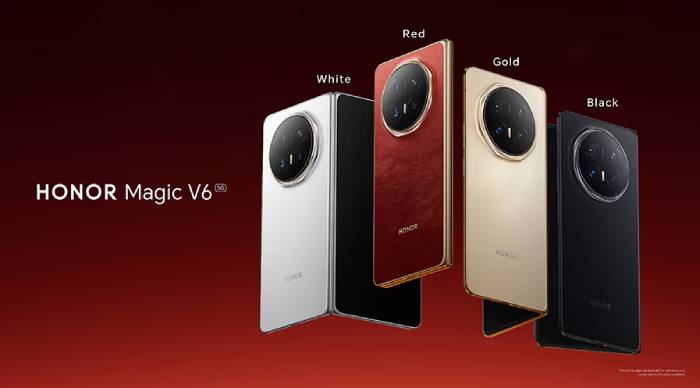
The HONOR Magic V6 occupies a deliberately different position. It is not ranked third because its hardware is weak; it has the strongest physical workspace of the group. It ranks behind Samsung and Apple for this specific search intent because HONOR's UK product materials do not clearly confirm that the Magic V6 can natively record a meeting, transcribe it and generate minutes in one documented sequence. Buyers should choose it for productivity and transcript processing, not for an assumed feature inherited from a different HONOR model.
HONOR confirms a 7.95-inch inner display and 6.52-inch cover display, both using 1–120Hz LTPO technology. The phone weighs 219g and measures 8.75mm when folded [9]. Unfolded, it offers much more room than the two conventional phones. A long transcript can stay visible beside an agenda, document, browser or task list, reducing the constant switching that makes detailed editing frustrating on a smaller display. This is especially helpful when correcting speaker labels or turning a summary into assigned actions.
The UK page documents Fast-Flex for split-screen launching of AI tools or customised apps, Gemini Cross App Action for opening documents, finding files or launching apps under its stated availability conditions, and an AI Meeting Agent that can alert the user when registered names are mentioned [9]. The meeting-agent wording must be interpreted carefully. A name alert is meeting-aware, but it is not evidence that the phone transcribes or summarises the audio. HONOR has described more complete Notes-based transcription and AI Minutes on materials for an earlier device, but that cannot be silently carried across to the Magic V6.
This uncertainty changes the buying decision. If your chosen third-party transcription service has been checked for UK availability, language support and data handling—or HONOR subsequently verifies a current Magic V6 workflow—the foldable becomes an excellent place to process its results. If you want a guaranteed built-in transcription route immediately, Samsung and Apple have clearer documentation. A large screen cannot compensate for a missing or unverified capture feature when native transcription is the primary reason for buying.
For sustained productivity, HONOR lists a Snapdragon 8 Elite Gen 5 platform and a 6,660mAh typical battery, together with maximum 80W wired and 66W wireless charging [9]. Those figures provide useful context for a device expected to run two apps on a large display, although transcription review is not as demanding as gaming or intensive video work. HONOR says the maximum charging rates require the corresponding original charger, so check what the Amazon listing includes rather than budgeting on the headline figure alone.
An independent UK review found the Magic V6 effective for multitasking and capable of long productivity use, while also reporting that its default Balanced mode limits peak performance in demanding tasks and that Performance mode increases heat and battery consumption [15]. That is unlikely to hinder ordinary transcript editing, note organisation or document comparison. It does reinforce the broader point that premium processor specifications do not automatically make every workflow faster; software integration and app layout matter more here.
The ownership compromise is physical as well as financial. At 219g, the foldable is substantially heavier than the 167g Galaxy S26 [1][9]. It is less convenient to hold one-handed while capturing a spontaneous memo, and a foldable mechanism creates a more complex ownership proposition than a conventional handset. In return, it provides the closest thing in this comparison to a pocket document workstation. Buyers who process substantial amounts of text directly on their phone may find that trade worthwhile; buyers who always finish notes on a laptop may not.
Main standout feature: the unfolded 7.95-inch workspace is unmatched by the other locked products. Its value appears after capture, when the user needs to read, compare, correct and redistribute information. The Magic V6 is therefore the best review-and-multitasking choice, but not the best verified native transcription choice.
Who it is best for: choose the Magic V6 if you already have a verified transcription service or confirmed current HONOR workflow and want the most comfortable mobile environment for handling lengthy transcripts. It also suits buyers who regularly move action points into documents while keeping reference material open. Avoid it if recorder-to-summary certainty, low weight or simple ownership is more important than screen space.
HONOR states that UK smartphones receive a 24-month warranty against defects in materials and workmanship under normal use, separate from consumer-law rights [10]. The Magic-Pen is sold separately, and the required charging accessories should be checked [9]. On Amazon, verify the live seller, UK specification, condition, fulfilment, included charger, returns and warranty route before ordering.
Comparison table: best phones for AI voice notes and meeting transcription
The decisive split is workflow versus workspace. Samsung offers the clearest recorder-first Android sequence; Apple offers live transcription integrated with Notes; HONOR offers the largest post-capture editing area but requires separate confirmation of the transcription route. None has evidence of universally superior accuracy, so choose around process, ecosystem and form factor rather than an unsupported accuracy ranking.
| Best for | Exact model | Key specifications | Key strength | Main limitation | Typical UK buyer |
|---|---|---|---|---|---|
| Compact native Android workflow | Samsung Galaxy S26 | 6.3-inch display; 167g; 256GB or 512GB | Documented Voice Recorder transcription and summary path | Post-recording process and limited editing space | Samsung Notes user capturing meetings and memos on the move |
| Apple Notes integration | Apple iPhone 17e | A19; iOS 26; 256GB or 512GB | Live audio transcription, transcript search and AI summaries in Notes | Small conventional display for long-form editing | iPhone user who wants audio and searchable notes together |
| Transcript review and multitasking | HONOR Magic V6 | 7.95-inch inner display; 6.52-inch cover; 219g; 6,660mAh typical battery | Largest workspace and split-screen productivity | Complete UK-native transcription workflow is not clearly verified | Mobile-first worker using a separately confirmed transcription service |
Samsung Galaxy S26: Check price on Amazon UK
Apple iPhone 17e: Check price on Amazon UK
HONOR Magic V6: Check price on Amazon UK
Frequently asked questions
Which phone has the best verified native workflow for meeting transcription?
The Samsung Galaxy S26 is the best recorder-first Android choice, while the iPhone 17e is the strongest option for Apple Notes users. Samsung's UK guidance documents recording in Voice Recorder, transcribing the saved file, producing a summary and moving the result into Samsung Notes [3][4]. Apple's Notes workflow records live audio, produces searchable transcript text, permits copying and can summarise the recording with Apple Intelligence enabled [7].
The right winner depends on when you need the text. Choose Samsung if capturing first and processing afterwards matches your routine. Choose Apple if live transcription inside an existing note is more useful. The HONOR Magic V6 has the best screen for working with completed text, but its UK product page does not verify an equivalent record-to-transcript-to-minutes sequence [9].
Can the iPhone 17e transcribe calls as well as room meetings?
Yes, for supported Phone and FaceTime calls, subject to Apple's stated software and availability conditions. Apple's iPhone guide says calls can be recorded and their spoken words viewed as transcripts in Notes, and that participants are automatically notified when recording begins [7]. For an in-person meeting, the relevant native route is recording audio within Notes.
Automatic notification does not remove wider responsibilities. A business may still need an appropriate purpose and lawful basis, advance information for participants, a retention rule and compliance with employer or sector policy [11]. Do not treat a call-recording button as universal permission.
Do AI-generated summaries replace proper meeting minutes?
No. Use them as drafts and recall aids, not authoritative records. Samsung warns that AI output quality can vary and describes speaker recognition in relation to the person nearest the microphone [3][4]. Overlapping voices, distant speakers, accents, jargon and background noise can create errors on any service. A summary can also lose tone or omit a condition even when the underlying transcript appears plausible.
Where recording is permitted, retain the source audio long enough to check important decisions, deadlines and quotations. Correct speaker names, compare actions with the recording and circulate formal minutes through the normal review or approval process. Delete audio according to your stated retention policy rather than keeping it indefinitely.
What should a UK buyer do before recording a work meeting?
Tell participants in advance and follow the organisation's recording and data-protection process. The ICO says organisations should have a valid purpose and lawful basis, consider people's rights and explain why recording is happening, how the material will be used and how long it will be retained [11]. Client contracts, regulated professions, employers and meeting platforms may impose additional rules.
Then perform a practical check: confirm microphone placement, available storage, battery level, supported language and whether the transcript or summary needs an account or network service. Run a permitted test before an important session and establish what will happen if the phone fails. No handset should be the only record of a critical decision without an agreed backup process.
Final verdict
The quick answer still holds: the Samsung Galaxy S26 is the strongest overall choice for most buyers seeking a compact AI voice notes phone in the UK. Its documented Voice Recorder, transcription, summary and Samsung Notes sequence most directly matches the complete capture-to-usable-text brief. Its compromise is the small display and post-recording rather than documented live-transcription process.
- Samsung Galaxy S26: best compact-value choice for Samsung's native transcription tools — Check price on Amazon UK.
- Apple iPhone 17e: best iPhone option for Apple Intelligence and third-party transcription apps, with a verified native Notes workflow too — Check price on Amazon UK.
- HONOR Magic V6: best foldable alternative for AI-assisted productivity and multitasking — Check price on Amazon UK.
Choose the iPhone 17e instead when live Notes transcription and Apple ecosystem continuity matter most. Choose the Magic V6 when editing workspace is the priority and you have separately verified the transcription service or current HONOR feature you intend to use. Before purchasing in the UK, check the exact Amazon seller, condition, fulfilment, returns, included accessories and warranty route—and confirm consent, language and account requirements before recording a real meeting.
By ChoiceWise