Mobile Banking Phones (UK 2026) – Secure Picks for Payments, Apps & Everyday Money
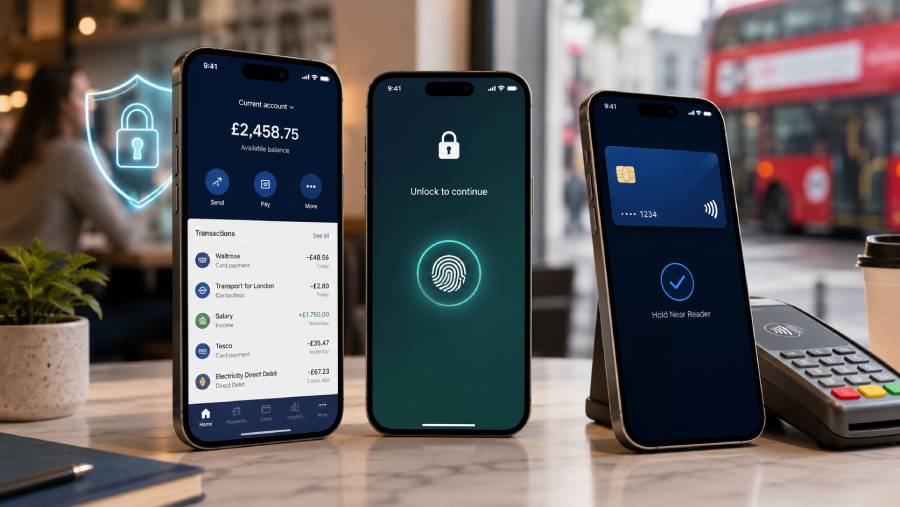
Reviewed for banking-app security, biometric protection, NFC payments, software support & everyday reliability – updated July 2026
🥇 Apple iPhone 17e – Best overall phone for secure mobile banking → Check price on Amazon UK
🥈 Samsung Galaxy A37 5G – Best secure Android phone with Knox Vault → Check price on Amazon UK
🥉 Google Pixel 10a – Best value phone for long-term banking security → Check price on Amazon UK
👉 Scroll down to see full reviews and Amazon UK links
Introduction
This guide is for UK buyers who want a dependable phone for everyday mobile banking in 2026, whether that means checking balances on the train, approving a card payment in a shop, using Apple Pay or Google Wallet at the till, or signing in to savings and money-transfer apps with a fingerprint or face scan. Modern banking apps do not simply reward raw speed. They work best on phones with current software, properly configured device security, reliable biometrics and contactless-payment support, and some banks can restrict access on rooted, jailbroken or otherwise unsafe devices. [1]
That is why this shortlist focuses on three current 2026 phones with strong day-to-day security foundations rather than headline-chasing flagship extras. Hardware-backed protection matters because sensitive credentials and biometric processes are better kept separate from ordinary apps where possible. Regular software and security updates matter because banks and wallet services depend on current platform protections. Reliable face or fingerprint unlocking matters because a secure phone also needs to be easy enough to use correctly, especially when you are authorising a payment quickly. NFC support matters because it is essential for contactless phone payments, while battery life and stable connectivity matter when you are travelling, confirming one-time codes or trying to reach your bank in a hurry. No phone can eliminate fraud if a user gives away passcodes, verification codes or banking details, so safe habits still matter on iPhone and Android alike. [2]
What Makes a Great Mobile Banking Phone in 2026
A great mobile banking phone in 2026 should feel secure without becoming awkward. The best options get the basics right first, then back them up with sensible software support and reliable day-to-day performance.
- Hardware-backed security: The strongest phones isolate sensitive operations using dedicated security hardware or trusted execution environments. That helps protect things like biometric matching, encryption keys and wallet credentials from the rest of the system.
- Secure biometric authentication: Banking apps commonly use fingerprints, facial authentication, passcodes and device-level security prompts. Good biometrics make sign-in faster and easier, but they are still part of a wider security setup rather than a replacement for sensible account behaviour.
- Long software and security support: Mobile banking is a long-term use case, so update support matters more than flashy one-year features. Banks can impose minimum operating-system requirements, and outdated software can eventually stop apps or wallet features working properly. [3]
- NFC and wallet compatibility: NFC is needed for contactless phone payments. It is not usually required just to open a banking app, but it is essential if you want to pay in shops with Apple Pay or Google Wallet.
- Banking-app compatibility and device integrity: Many banks and payment services dislike rooted, jailbroken or heavily modified devices. If the phone’s integrity checks fail, some banking or tap-to-pay features may be blocked until the device is restored to a safer state.
- Theft controls and recovery tools: Remote locking, location tools and anti-theft features matter because a lost phone is also a banking risk. Good recovery tools help limit damage if the device goes missing, but they still work best when enabled before anything goes wrong. [4]
- Battery life, readability and dependable connectivity: A banking phone should still be easy to unlock outdoors, readable at the till, and able to last through commuting, travel and two-factor authentication prompts. Public Wi‑Fi and phishing remain risks regardless of the phone you use, so the safest device is one you can keep updated, locked down and use confidently.
Top 3 Mobile Banking Phone Picks (UK 2026)
1. Apple iPhone 17e – Best overall phone for secure mobile banking
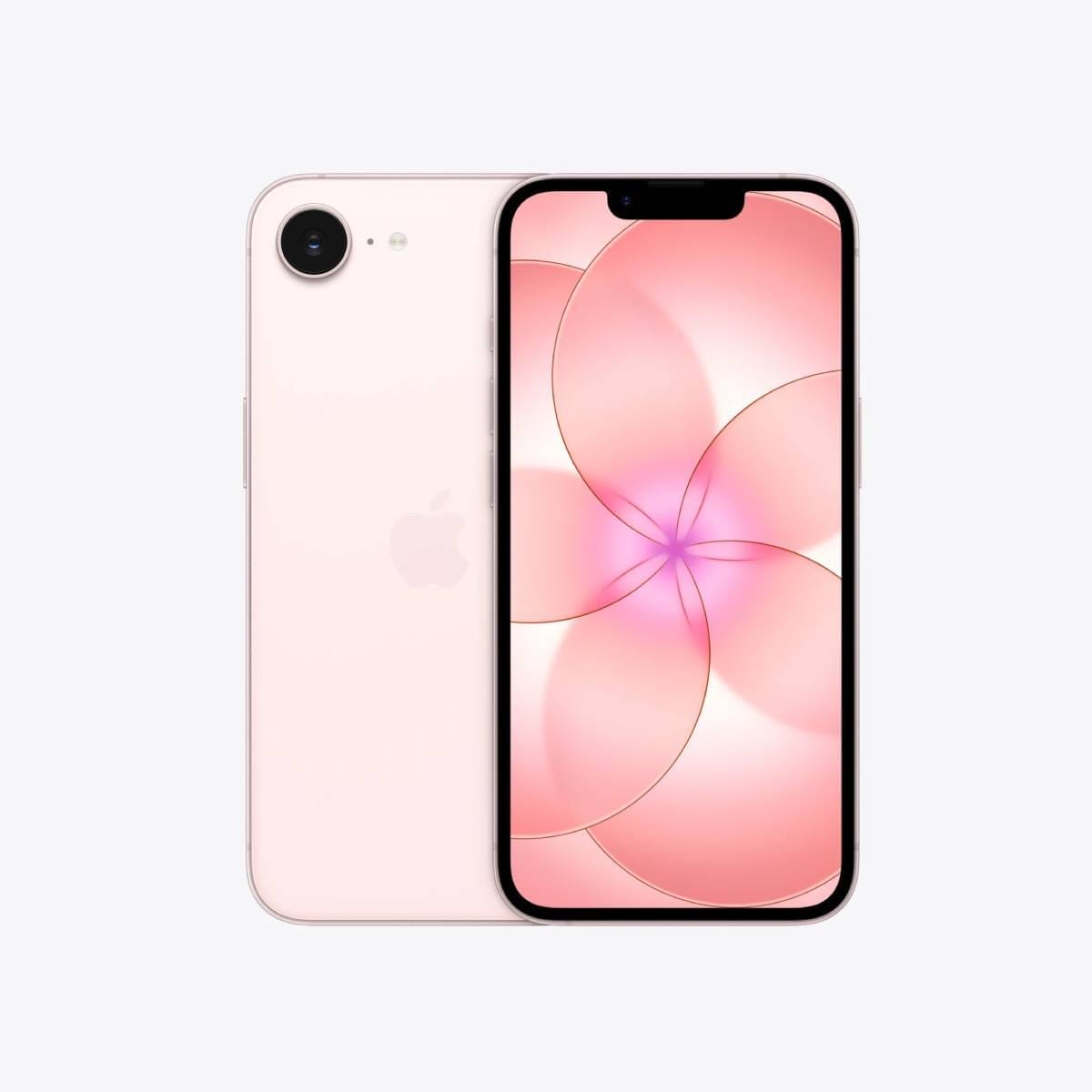
The iPhone 17e is the strongest overall choice here because it keeps mobile banking simple in the best possible way. Apple gives it Face ID, Apple Pay, NFC, a 6.1-inch OLED display, IP68 water resistance and all-day battery life, with Apple officially rating video playback up to 26 hours. For ordinary banking tasks, that matters more than having the most expensive cameras or the biggest screen in the range. If you already use other Apple services, the iPhone 17e feels especially natural because unlocking, app sign-in, purchase approval and wallet use are all tightly integrated into the same system. [5]
Face ID is a major part of that appeal. Apple says it can be used to securely unlock the phone, authenticate purchases and sign in to apps, and Apple’s security documentation explains that biometric matching and the keys involved in sensitive operations rely on the Secure Enclave rather than ordinary app space. Apple Pay also requires authentication and uses the Secure Element for payment credentials, which is exactly the kind of hardware-backed separation you want on a banking phone.
For theft concerns, Apple’s combination of Find My and Stolen Device Protection is genuinely useful. Find My can help locate, lock or erase a missing iPhone, while Stolen Device Protection adds extra biometric checks and security delays for certain high-risk account changes, particularly away from familiar locations. That is helpful if you are worried about phone theft leading to further account compromise. [6]
Apple does not publish a simple fixed “seven years” promise for iPhone in the same way Google does for Pixel, but Apple is still bringing iOS 26 to iPhone 11 and later, which suggests a long support runway by recent smartphone standards. For buyers who want a controlled, familiar, low-friction environment for banking apps and contactless payments, the iPhone 17e is the most reassuringly polished option of the three.
✅ Why this pick
Pros:
- Face ID, Apple Pay and iOS work together very smoothly for app sign-ins and in-store payments
- Hardware-backed biometric and payment security is built around Apple’s Secure Enclave and Secure Element
- Strong theft tools, all-day battery life and likely long software support make it a dependable long-term banking phone
Cons:
- Buyers who prefer fingerprint unlocking or a more customisable Android setup may find it less flexible
Main standout feature:
The iPhone 17e’s biggest advantage is how little friction it adds to secure everyday banking. Face ID, Apple Pay and iOS security prompts feel consistent and easy to trust, which is exactly what many buyers want from a phone they use for money every day. [7]
Who it’s best for:
It is best for UK buyers who already live happily inside Apple’s ecosystem and want the most straightforward, tightly controlled mobile banking experience of the three. It is also a strong pick for older users or busy commuters who value simple, repeatable authentication.
Amazon UK Check: 👉 Check price on Amazon UK – As the best overall pick in this guide, the iPhone 17e makes a lot of sense for buyers who want secure banking, Face ID and Apple Pay in one polished package. It is worth checking the current Amazon UK listing because storage configuration, price and availability may vary.
Check our website: for more details about Apple iPhone 17e
2. Samsung Galaxy A37 5G – Best secure Android phone with Knox Vault
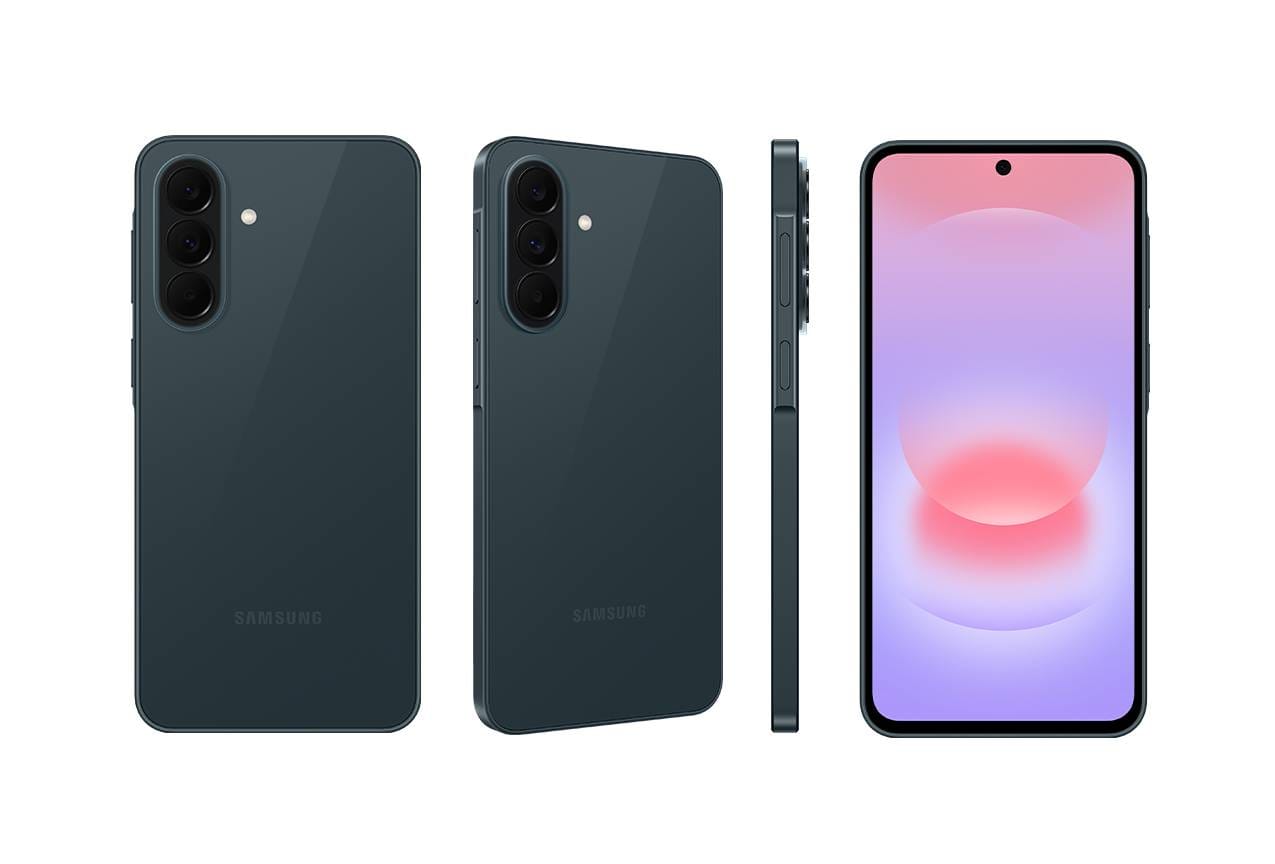
The Galaxy A37 5G earns its place because it brings Samsung’s most important practical security ideas into a more accessible part of the market. Samsung’s UK product page gives it a fingerprint sensor, IP68 protection, a 6.7-inch Super AMOLED display, a 5,000mAh battery, 5G support and up to six OS upgrades with six years of security and maintenance releases, while the UK support page lists its security-update period as valid until 31 March 2032. For a buyer who expects to keep one phone for banking, bills, tap-to-pay and everyday finance apps for several years, that is a strong promise at this level. [8]
The security story is the real reason to buy it. Samsung says the A37 5G uses EAL5+ certified Knox Vault to protect sensitive information, and Samsung’s 2026 Galaxy A launch materials say the A series also brings over the Security & Privacy Dashboard, Auto Blocker, Theft Protection, Privacy Alerts and related privacy tools. In practical terms, that gives you a more security-focused Android experience than many mid-range phones, especially if you actually spend a few minutes turning those features on and learning where they live in settings.
For mobile payments, the A37 5G is clearly built for the modern Android banking routine: fingerprint unlock for quick approvals, NFC-ready contactless use, and the usual Google Wallet-style tap-to-pay setup on supported banks and cards. Samsung’s current UK Wallet compatibility page can change over time, so if Samsung Wallet itself specifically matters to you, it is sensible to confirm eligibility at the time you buy. The safer day-to-day assumption is that the A37’s real strength is Samsung’s security stack plus practical Android payments, not luxury extras. [9]
Battery life is another strong point. Samsung markets it as a two-day phone with up to 60% charge in 30 minutes using Super Fast Charging 2.0, and its large, bright display also helps when you are reading payment prompts or banking in poor light. Put simply, this is the secure Android pick for buyers who want sensible long-term support, a trusted fingerprint-first setup and Samsung’s broader privacy features without paying flagship money.
✅ Why this pick
Pros:
- Knox Vault, Theft Protection and Samsung’s security dashboard make it the strongest Samsung banking phone at this level
- Long support window, with updates running to 2032 on Samsung’s UK support schedule
- Big screen, strong battery life and practical everyday performance suit heavy banking and payment use
Cons:
- If you specifically want Samsung Wallet rather than Google Wallet, you should confirm current UK wallet eligibility before ordering
Main standout feature:
Knox Vault is the reason this phone stands out. It gives the Galaxy A37 5G a more serious hardware-backed security footing than many cheap Android handsets, which is especially attractive if banking, stored credentials and device longevity are high on your list. [10]
Who it’s best for:
It is best for UK buyers who prefer Android, trust Samsung’s ecosystem and want a secure, practical phone for banking apps, contactless payments and long-term daily use without jumping into premium price territory.
Amazon UK Check: 👉 Check price on Amazon UK – As the best secure Android pick in this shortlist, the Galaxy A37 5G is worth checking on Amazon UK if you want Samsung’s Knox Vault security, fingerprint unlock and a long support window at a more accessible price. As ever, price, storage configuration and availability may vary.
Check our website: for more details about Samsung Galaxy A37
3. Google Pixel 10a – Best value phone for long-term banking security
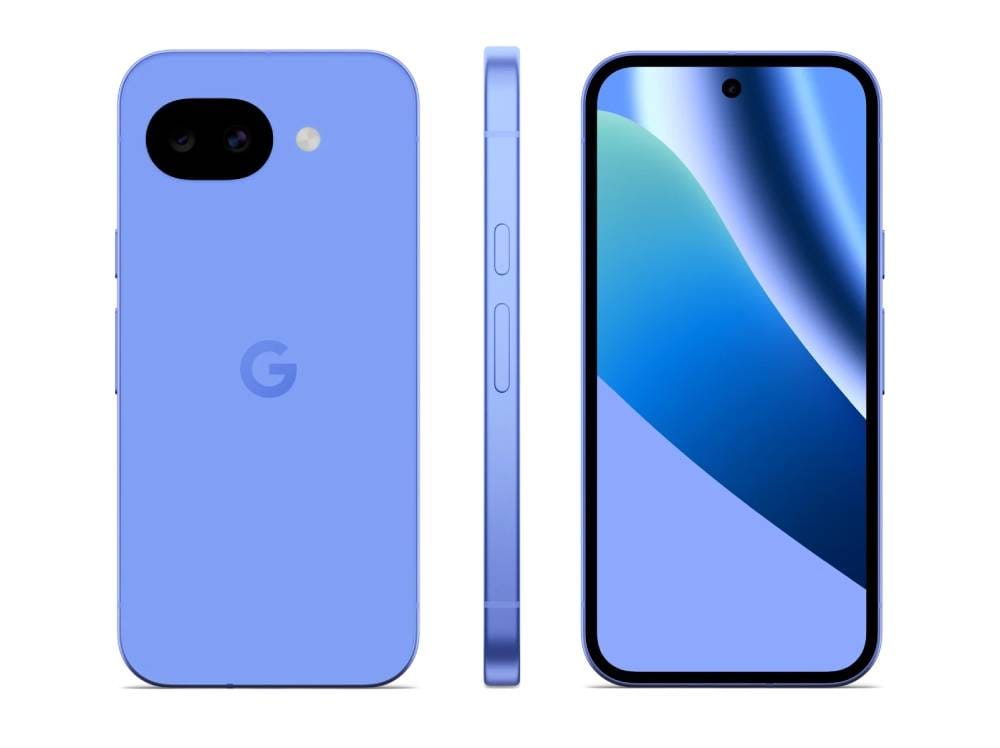
The Pixel 10a is the value pick because Google combines a mid-range price position with an unusually serious long-term security package. On Google’s UK specs page, the Pixel 10a gets the Tensor G4, Titan M2 security coprocessor, multi-layer hardware security, NFC, Google Wallet support, a 5,100mAh battery, IP68 dust and water resistance, and both Fingerprint Unlock and Face Unlock. Google’s Pixel support documentation then adds the headline many banking-focused buyers care about most: seven years of OS, security and Pixel Drop updates. [11]
That support promise is a big deal for mobile banking. Banks keep raising minimum software requirements, and long update support makes it easier to keep your phone compatible and properly patched for years without feeling pushed into an early replacement. Google also leans hard into device security. The Pixel 10a uses the Tensor security core, Titan M2 and Trusty trusted execution environment, and Google explicitly lists anti-malware and anti-phishing protection, spam protection in Phone and Messages, privacy controls in the Security and Privacy Hub, and VPN by Google at no extra cost on the UK specs sheet. [12]
For daily use, the Pixel 10a feels practical rather than flashy. Fingerprint unlock remains the safer banking-friendly feature to focus on, but Face Unlock is there as an extra convenience for ordinary phone access. Google’s Face Unlock documentation says the face model is stored securely on the device and not shared with other Google services or apps. That is reassuring, though it is still wise not to assume every UK banking app will use every available biometric method in exactly the same way.
The rest of the banking case is equally solid. Google rates the battery at 30+ hours, with up to 120 hours in Extreme Battery Saver, and the Pixel Phone Help pages explain how NFC and Google Wallet are used for pay contactless. Add the clean software, direct Google updates and broad anti-spam and anti-phishing emphasis, and the Pixel 10a becomes the best-value secure Android phone for people who care more about long-term trust than flashy extras. It still cannot stop every scam or phishing attempt on its own, but it gives careful users a very strong foundation.
✅ Why this pick
Pros:
- Seven years of OS and security updates is excellent for long-term banking reliability
- Titan M2, Tensor security core and Google’s clean software stack make security feel unusually strong for the money
- NFC, Google Wallet, fingerprint unlock and excellent battery life make it very easy to live with
Cons:
- Face Unlock is best treated as a convenience feature alongside fingerprint and passcode, not as a reason to ignore good account habits
Main standout feature:
The Pixel 10a’s biggest advantage is long-term peace of mind. Seven years of updates, direct-from-Google patches and multi-layer hardware security make it the easiest value pick for buyers who want to keep one banking phone safely for a long time. [13]
Who it’s best for:
It is best for UK buyers who want a clean Android experience, regular Google updates and strong security fundamentals without paying more than they need to. It is especially appealing if you prefer Google services and want a straightforward, low-bloat phone for finance apps and tap-to-pay.
Amazon UK Check: 👉 Check price on Amazon UK – As the best value option in this guide, the Pixel 10a is well worth a look on Amazon UK if long-term updates, Google Wallet and direct Google security support matter more to you than premium-brand extras. Current price, storage configuration and availability may vary.
Check our website: for more details about Google Pixel 10a
Comparison Table
|
Feature |
Apple iPhone 17e |
Samsung Galaxy A37
5G |
Google Pixel 10a |
|
Operating system |
iOS 26 at launch/support path |
Android 16 / One UI 8.5 |
Android 16 |
|
Primary biometric authentication |
Face ID |
Fingerprint sensor |
Fingerprint Unlock |
|
Extra biometric option |
— |
— |
Face Unlock |
|
Hardware-backed security |
Secure Enclave + Secure Element for Apple Pay
flows |
EAL5+ certified Knox Vault |
Titan M2 + Tensor security core + Trusty TEE |
|
Main security platform |
Apple platform security / iOS protections |
Samsung Knox / Knox Vault |
Google Pixel multi-layer hardware security |
|
Digital wallet |
Apple Pay |
Google Wallet is the safe assumption; confirm
Samsung Wallet eligibility if needed |
Google Wallet |
|
NFC contactless payments |
Yes |
Yes |
Yes |
|
Security-update support |
Apple does not state a fixed years figure, but
Apple is still bringing iOS 26 to iPhone 11 and later |
Up to 6 OS upgrades, 6 years of security
updates; support period listed to 31 March 2032 |
7 years of OS, security and Pixel Drop updates |
|
Theft and device-recovery tools |
Find My, Lost Mode, Stolen Device Protection |
Theft Protection, Remote lock, Samsung Find |
Theft protection, Safety Check, emergency
tools |
|
Anti-malware or anti-phishing features |
Strong platform security and Wallet
protections, but no phone stops all scams |
Auto Blocker, Privacy Alerts, Security &
Privacy Dashboard |
Anti-malware, anti-phishing and spam
protection listed by Google |
|
Display |
6.1-inch Super Retina XDR OLED |
6.7-inch FHD+ Super AMOLED, 120Hz |
6.3-inch Actua pOLED, 60–120Hz |
|
Battery life |
All-day; up to 26 hours video playback |
5,000mAh; marketed for up to 2 days |
30+ hours; up to 120 hours with Extreme
Battery Saver |
|
Water resistance |
IP68 |
IP68 |
IP68 |
|
Ease of use |
Excellent for buyers already used to iPhone |
Very good for Android users who like Samsung’s
layout |
Very good for buyers who prefer clean Android |
|
Best banking strength |
Seamless Face ID + Apple Pay + tightly
integrated iOS security |
Knox Vault + long support + Samsung security
tools |
Long update promise + direct Google security
stack |
|
Best for |
Buyers who want the easiest all-round secure
banking phone |
Buyers who want Samsung’s secure Android
ecosystem at a sensible price |
Buyers who want the best value for long-term
Android security |
|
Typical UK buyer profile |
iPhone user who wants low-friction banking and
contactless payments |
Android user who wants Samsung security
without going premium |
Value-focused Android buyer who keeps phones
for years |
The table above is compiled from official Apple, Samsung and Google product specifications, security documentation, wallet help pages and support commitments, with one trusted third-party source used only to verify the Galaxy A37 5G’s NFC payment capability.
Apple iPhone 17e → Check Price on Amazon UK
Samsung Galaxy A37 5G → Check Price on Amazon UK
Google Pixel 10a → Check Price on Amazon UK
What to Consider Before Buying a Mobile Banking Phone
Before you buy, think about how you actually bank rather than which brand sounds most impressive. A good banking phone is one you can keep secure, keep updated and use confidently in everyday life.
- Choose the platform you will use properly: If you already prefer iOS, the iPhone 17e will feel more natural. If you prefer Android, the Samsung and Pixel options are both strong but with different styles of software and security tools.
- Check your own bank’s app requirements: Some banks set minimum OS versions and may block rooted, jailbroken or otherwise unsafe devices. Lloyds and NatWest both publish app requirements and security guidance, so it is worth checking your own bank’s latest support page before buying.
- Think about biometrics in real life: Some people prefer Face ID because it is effortless, while others trust a fingerprint more, especially in poor lighting or when wearing glasses. Either way, keep a strong passcode or PIN as your backup.
- Prioritise hardware-backed protection and updates: Secure hardware and long software support are more important for mobile banking than bragging rights specs. They help keep wallet functions, password storage and app compatibility in good shape over time.
- Confirm your payment setup: If you want phone-based contactless payments, make sure the phone supports NFC and your preferred wallet. Apple Pay and Google Wallet are straightforward here; Samsung buyers who specifically want Samsung Wallet should confirm current eligibility at purchase.
- Take theft settings seriously: Turn on device location, remote locking and theft protection tools before anything goes wrong. Recovery features are much more useful when they are configured in advance.
- Do not use rooted, jailbroken or unofficial software builds: Banking apps and contactless payment systems may reject them, and banks may view them as unsafe.
- Keep your habits as secure as your phone: Download banking apps only from the App Store or Google Play, keep both the OS and the banking app updated, and do not trust unexpected links, urgent calls or messages asking for codes or transfers. NCSC guidance is clear that phishing and social-engineering scams can still affect careful users on any phone.
- Check Amazon UK purchase details carefully: Listings, prices, storage options, returns and warranty terms can change. It is worth reviewing the current product page before ordering, especially if you want a particular storage tier for long-term use.
Frequently Asked Questions
Are iPhones safer than Android phones for mobile banking?
Not automatically. Current iPhones and reputable Android phones can both offer strong security when they are updated, locked properly and used sensibly.
Do I need NFC to use a mobile banking app?
Usually no for the app itself, but yes if you want contactless wallet payments in shops with Apple Pay or Google Wallet.
Can banking apps work on rooted or jailbroken phones?
Some may not. Banks such as Lloyds can block unsafe devices, and Google warns that modified Android phones may fail security requirements for tap-to-pay.
How important are security updates for mobile banking?
Very important. Banks can require newer software, and long update support helps keep apps, wallets and platform protections current.
Which of these three phones is best for everyday banking?
For most people it is the iPhone 17e overall, the Galaxy A37 5G for Samsung-style Android security, and the Pixel 10a for the best long-term value. Check your own bank’s compatibility requirements first.
Final Verdict
- Apple iPhone 17e is the best overall choice for buyers who want a secure, straightforward mobile banking experience with Face ID, Apple Pay and strong integration between hardware and iOS → Check price on Amazon UK
- Samsung Galaxy A37 5G is the best secure Android option for buyers who want Knox Vault, NFC payments and long-term Samsung security support at a more accessible price → Check price on Amazon UK
- Google Pixel 10a is the best value option for buyers who want Google’s hardware-backed security, clean Android software and long-term protection → Check price on Amazon UK
For a UK buyer in 2026, all three are credible mobile banking phones; the right one comes down to whether you want Apple’s simplicity, Samsung’s security toolkit or Google’s long update promise.
Still deciding?
If you'd like to dive deeper into the specs or see how these models compare side-by-side, check out:
- 📊 Compare these phones here
- 📱 See full product details for Apple iPhone 17e
- 📱 See full product details for Samsung Galaxy A37 5G
- 📱 See full product details for Google Pixel 10a
We update our comparisons regularly to keep everything accurate, up to date, and UK-focused.